

Опис
Hack The SEO does three things, free.
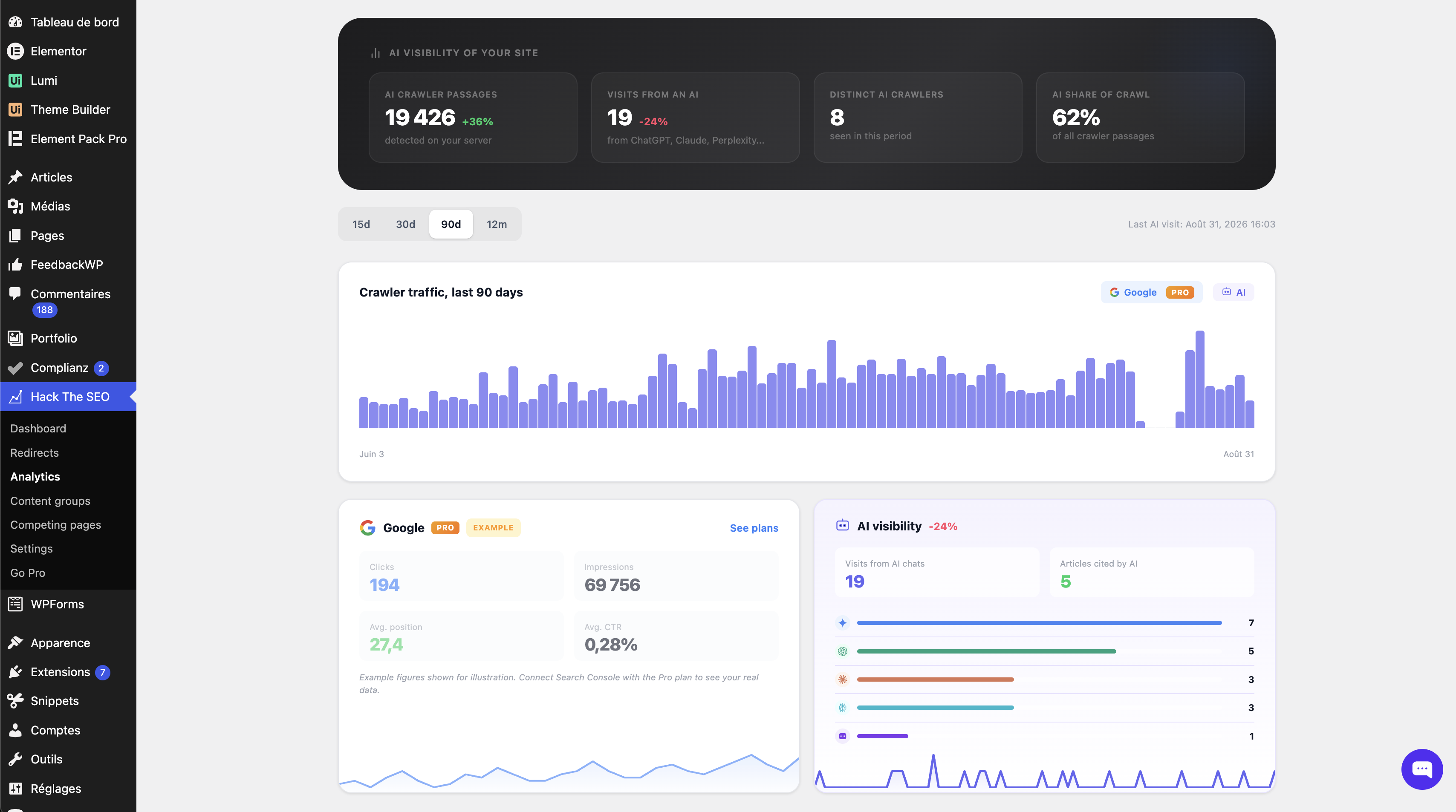
It shows you which AI crawlers read your pages, which pages they read, and when. No analytics tool can tell you that. It tells you what to fix so those pages are worth quoting. And it handles the whole technical SEO layer: schema, sitemaps, redirects, meta tags.
It also ships a read-only MCP server — the Model Context Protocol, the standard an AI client uses to read data from a tool. You connect Claude and ask about your site instead of clicking through screens.
You do not have to choose. Hack The SEO runs next to Yoast SEO, Rank Math, All in One SEO and SEOPress. It detects the one you already have, then steps aside on everything that plugin already produces. Nothing is printed twice, and you configure nothing. What it adds is what none of them gives you: the AI crawler log, the GEO score, the cannibalization report.
Why your analytics cannot see this. GPTBot, ClaudeBot and PerplexityBot do not run JavaScript, so a JavaScript analytics tool never sees them. Hack The SEO reads the request on your server, before any script runs, and writes every visit into a table in your own database.
Safe to install today, on the site you already have
- Nothing leaves your site on its own. No account, no API key, no telemetry. Out of the box the plugin makes zero outbound requests. Every request it can make is triggered by you, and listed under “External services”.
- Nothing breaks if you uninstall. Your redirects, metadata and settings stay in the database unless you ask for them to be deleted.
- Nothing slows your visitors down. No external call in the front-end path. Scores and audits run in the admin, never on a visitor’s request.
- Runs on the hosting your clients actually have. PHP 7.4, WordPress 5.9, MySQL or MariaDB. No Composer, no build step.
Everything you get, and all of it is free
- AI crawler log: 18 user agents from OpenAI, Anthropic, Perplexity, Apple, Google, Meta, Cohere and Common Crawl, recorded server-side.
- Weekly report by email: once a week, your own site tells you how many AI crawlers came, on how many pages, how many visitors arrived from an AI chat, and which broken links appeared. Sent by WordPress, from your site, to you. Opt-in.
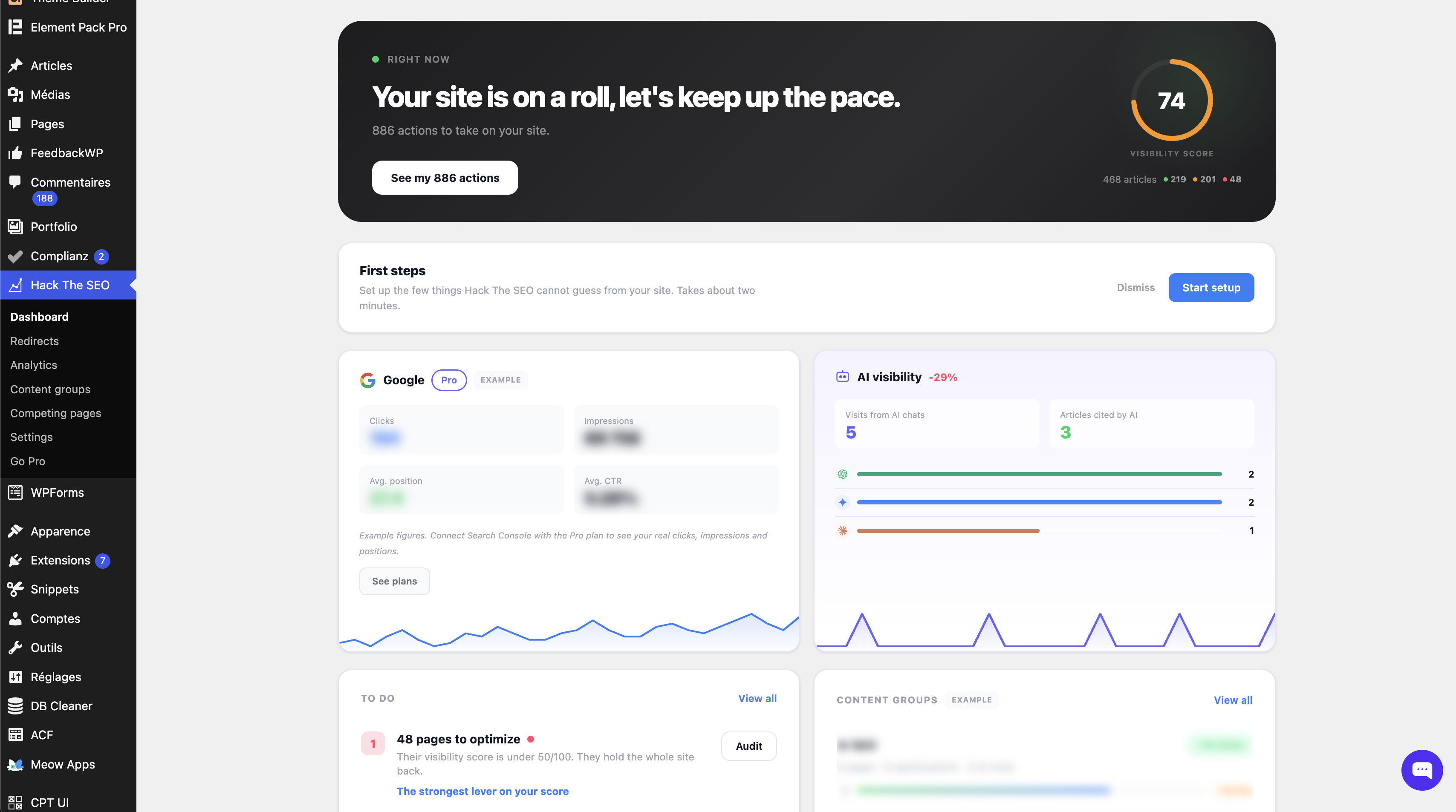
- GEO score per page: generative engine optimization, also called AEO, scored out of 100 on six criteria, with the failing ones named.
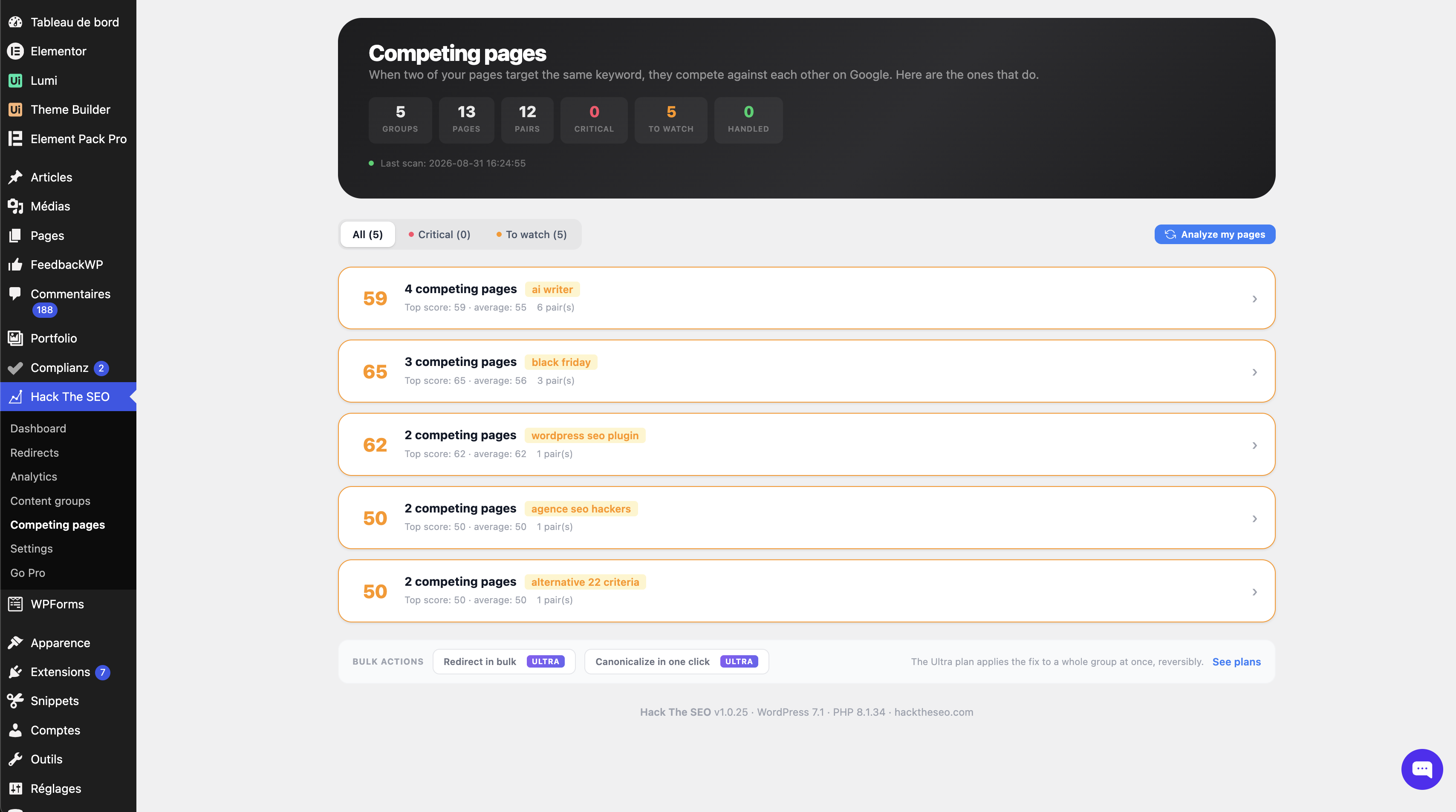
- Keyword cannibalization report: cannibalization is when two of your own pages chase the same search, so Google has to pick and both lose. The report names each competing pair and what to do with it.
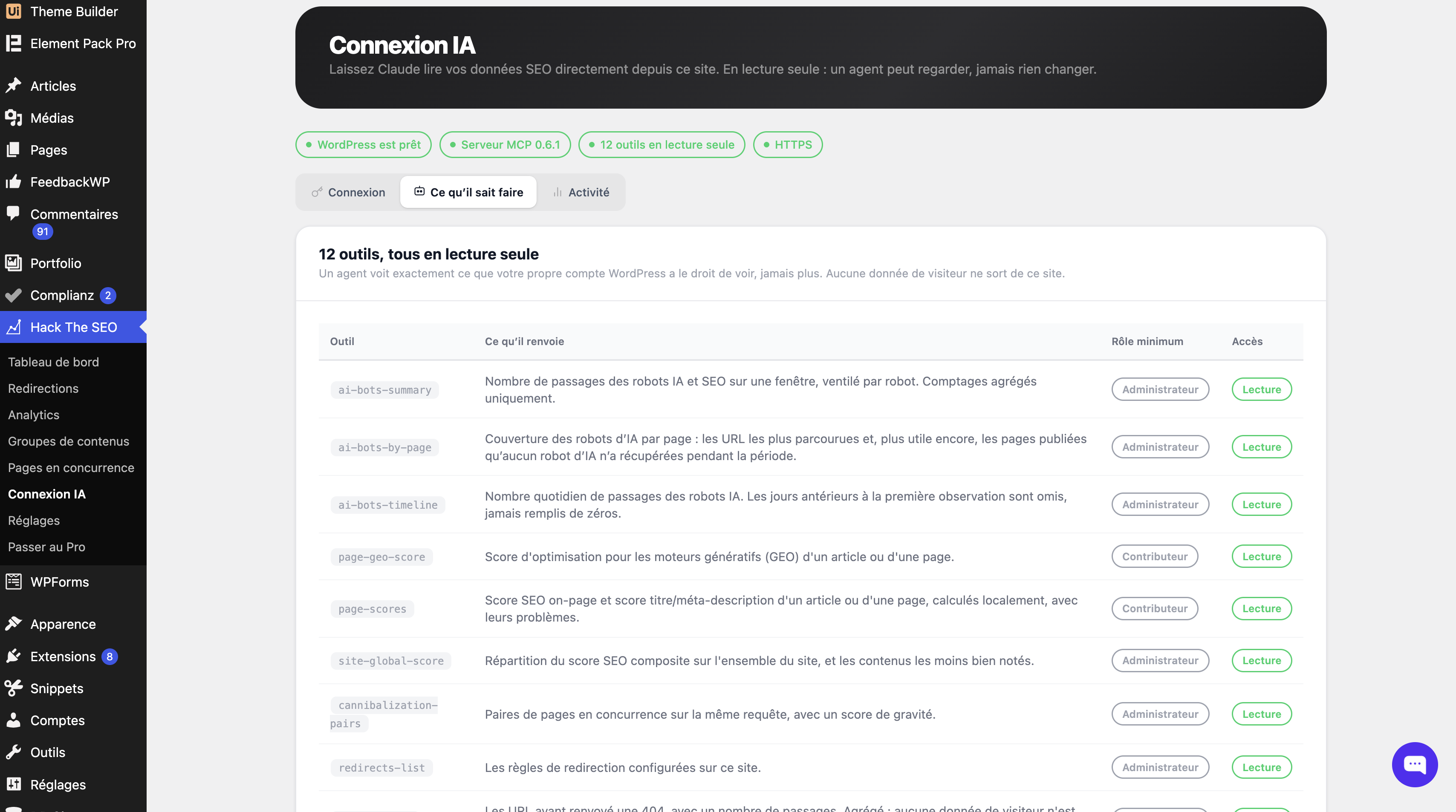
- A read-only MCP server (Model Context Protocol): connect Claude and ask your site directly. Twelve abilities, and all twelve read.
- JSON-LD schema and structured data: the hidden summary Google reads to understand a page. 60+ types, generated automatically, editable page by page. It is what makes a page eligible for rich results, also called rich snippets.
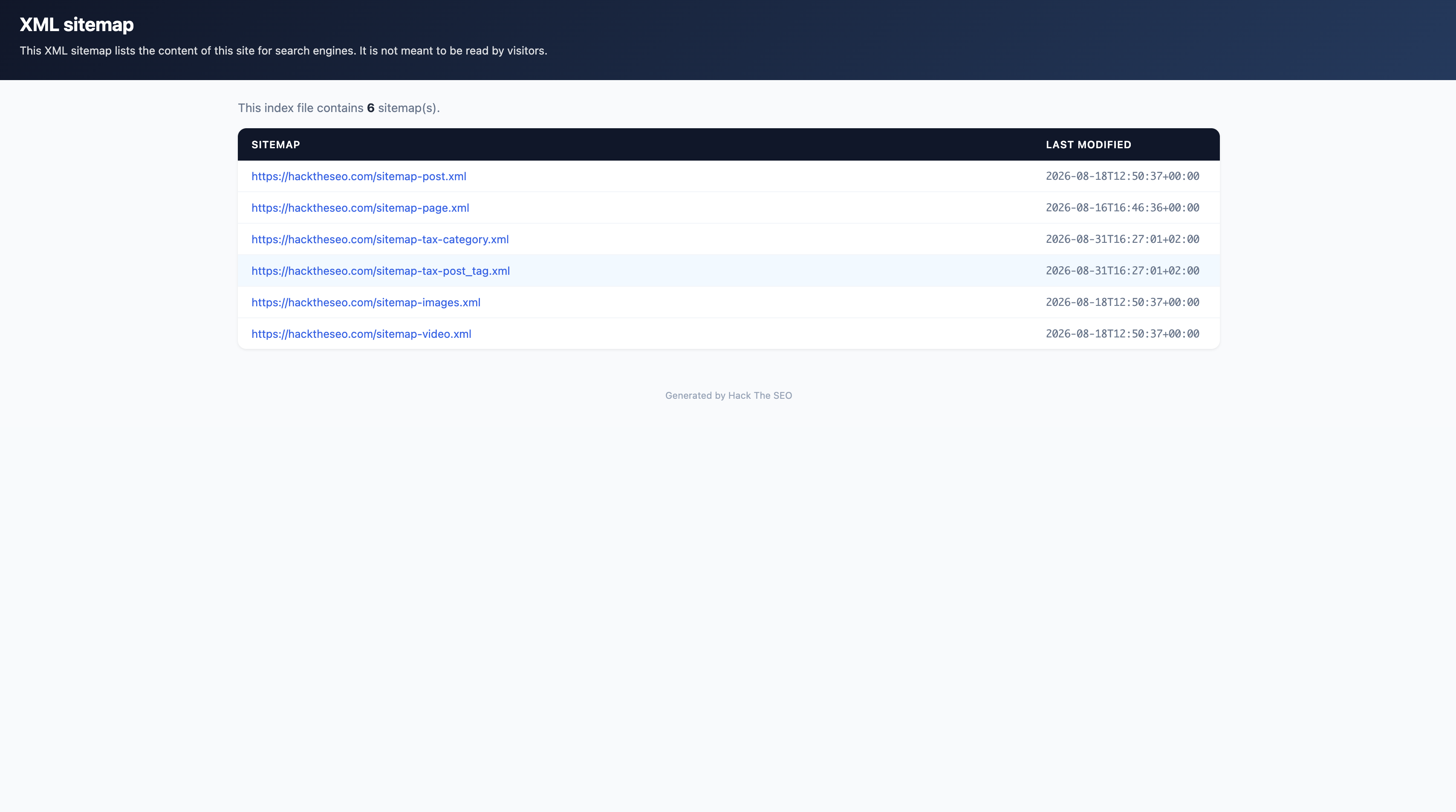
- XML sitemaps: sitemap index, per-type sitemaps, human-readable XSL stylesheet.
- Redirects and 404 monitor: 301s, regex rules, CSV import and export, a 404 log with one-click 404-to-redirect.
- Meta titles and descriptions: the blue line and the grey text Google shows. Templates, variables, and a live SERP preview.
- Open Graph and Twitter Cards: the title, text and image people see when your link is shared on social media. On every post, page and custom post type.
- Alt text auto-fill: images published without alt text get one, derived from the file name, the title or the focus keyword. The audit lists the ones still missing.
- Canonicals, breadcrumbs, robots and noindex: which page is the original, the trail of links back to the home page, and what you keep out of Google. Per post, per type, per category. A robots.txt editor is included.
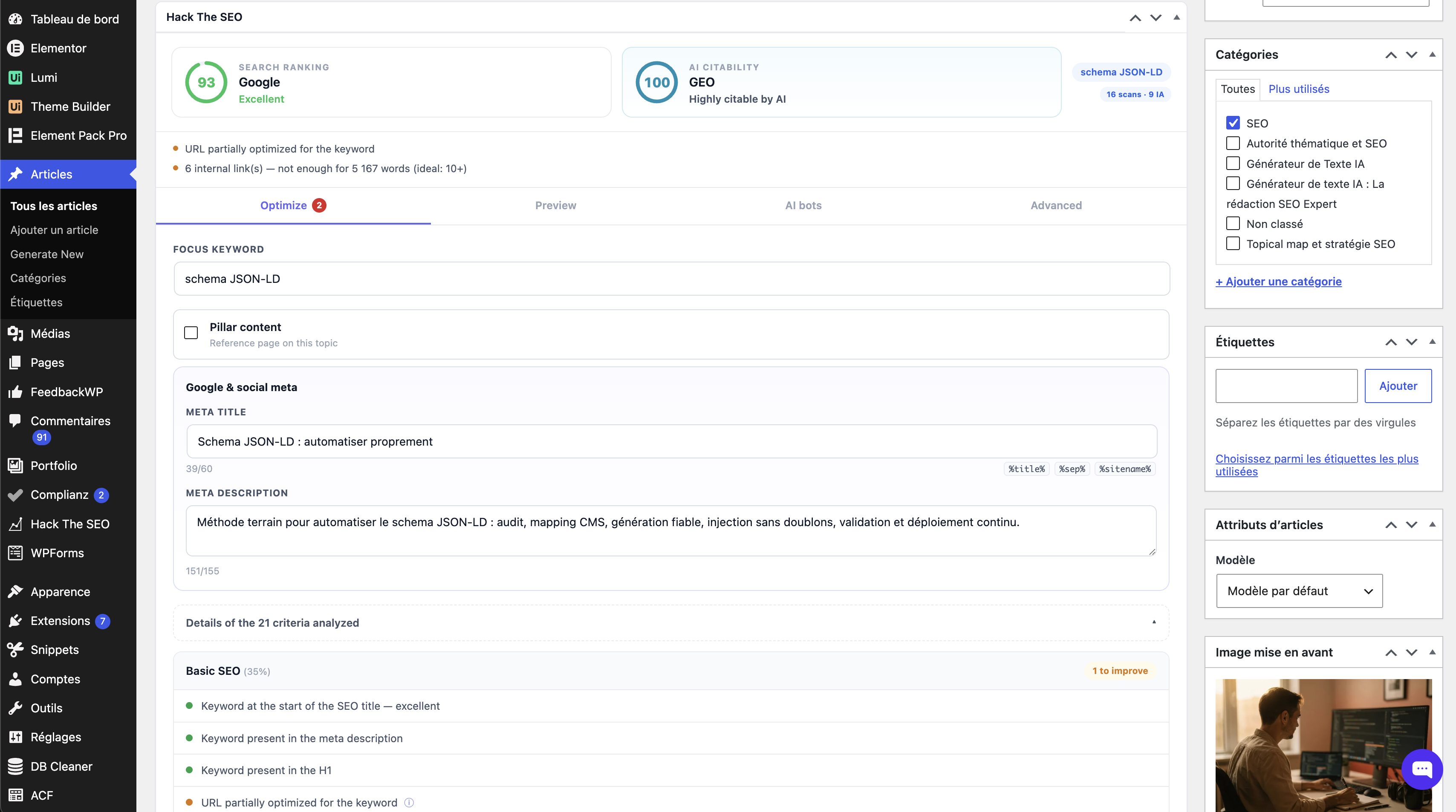
- On-page audit (onpage SEO): 21 checks in the editor, a Google score and an AI citability score side by side.
- Orphan detection: pages with no inbound internal link are flagged in the global score, because a page nothing links to is a page nothing finds.
- IndexNow: ping Bing, Yandex, Naver, Seznam and Yep the moment you publish. Off until you switch it on.
- llms.txt: a plain-text index of your key pages, for AI crawlers. Built from your real content, not from a template. Every page also gets a Markdown version at
/your-page.md, the plain format an AI model reads most reliably. - WooCommerce: product and category schema, shop-aware sitemaps.
See which AI crawlers read your pages
- Detection runs on your own server, while WordPress builds the page. No beacon, no tracking script, no external service.
- GPTBot, ChatGPT-User, OAI-SearchBot, ClaudeBot, Claude-User, Claude-SearchBot, PerplexityBot, Perplexity-User, Applebot, CCBot, Bytespider and seven more.
- Every hit is written to a table in your own database, with the URL and the timestamp.
- Human visits arriving from an AI chat are counted through the referrer, so you see the crawler and the click it eventually sent.
- Only agents these companies really send.
Google-Extendedis a robots.txt token, not a crawler, so counting it would count nothing.
Other plugins give you a switch to block AI crawlers. This one tells you whether they came.
How you know it works
You do not have to do anything. Activate the plugin and let it sit: the crawlers come on their own and the screen fills up on its own. On a new site that can take weeks, and an empty screen is an answer too.
If you have a terminal and want to check today, ask your own server for a page while pretending to be GPTBot, then refresh the screen:
curl -A GPTBot https://your-site.tld/any-page/
Use a real post or page URL, not the home page: the detector only reads single pages. Everything here is built the same way: if we claim it, you can check it.
Find out which of your pages are worth quoting
GEO, generative engine optimization (also called AEO), is the work of making a page a generative engine can read, understand and quote. Each page is scored out of 100 on six questions:
- Does the introduction answer the question directly?
- Are there lists or tables a machine can parse?
- Are there figures to quote: percentages, dates, amounts?
- Are outside sources cited?
- Is there an FAQ or a definition a model can lift as it stands?
- Has the page been updated recently?
The rules are plain PHP in the plugin. Open the file and read them. No model decides your score, and no API key is involved.
Ask your site directly, from Claude
The plugin ships a read-only MCP server. Connect Claude Code or Claude Desktop, and ask instead of clicking through screens:
- Which published pages has no AI crawler read at all?
- Why does this article score 38 out of 100?
- Which of my pages compete with each other?
- Which URLs return a 404 most often?
Twelve abilities, and all twelve read. No write among them, and no setting that turns one on. Every call is made by a signed-in WordPress user and checks a capability, so drafts and password-protected content stay out. The connection is inbound: your client calls your site, and no third party is contacted. It needs WordPress 6.9, where the Abilities API entered core. The FAQ has the detail.
Already running Yoast, Rank Math, All in One SEO or SEOPress?
Keep it. Hack The SEO installs next to it and steps aside on its own.
The usual reason not to run two SEO plugins is duplicate output: two title tags, two canonicals, two sets of schema. This plugin is built to avoid exactly that, without you configuring anything.
- It gets out of the way, module by module. On activation it detects the plugin in place and stops emitting what that plugin handles: meta tags, canonical, schema, sitemap, breadcrumbs, robots, and hreflang. Nothing is emitted twice.
- It never deactivates your plugin and never changes its settings.
- What you came for works from day one. The AI crawler log, the GEO score and the cannibalization report print nothing on the front end, so nothing can overlap.
- You stay in charge. A dedicated screen lists every overlap and lets you decide which plugin owns what. Your choice always wins.
- And if you would rather replace than stack, the migration wizard imports your meta titles and descriptions, your robots and noindex rules, your canonicals, your redirects and your schema settings. It runs as a dry run first, so you see what will be imported, counted per type, before anything is written. It never deletes the source data.
Your data stays yours
- AI crawler data, GEO scores and audit results stay in your database. No telemetry, no phone-home, no usage statistics.
- Outbound requests happen only when you ask for them: IndexNow pings and the opt-in form for the guide and newsletter, both idle until you use them. The weekly report is your own WordPress writing to you.
- Read the privacy policy if you want the long version.
Works with the tools you already use
Tested with Elementor, Divi, Bricks, Oxygen and WPBakery: it reads the rendered page, so scores and schema see what your visitors see. Multisite compatible. Works with caching plugins and CDNs, with one honest limit: a full-page cache that answers before WordPress loads also answers before this plugin runs, so those hits are not logged.
What this plugin will not do, and will not pretend to
- It does not promise you a ranking or a position. Nobody can, and anyone who does is selling something.
- It does not write your content for you, suggest internal links, or track your rankings.
- It does not make you “visible in ChatGPT” by dropping an llms.txt on your server. That claim has no evidence behind it.
- It does not block AI crawlers. It measures them.
Useful links
- Documentation
- Getting started
- SEO and GEO glossary, 100+ terms defined
- Free SEO audit
- Blog
- Support
- Contact us
External services
This plugin connects to two external services, neither used out of the box: IndexNow is off by default, and hacktheseo.com is contacted only when you submit the opt-in form.
IndexNow
What it is. IndexNow is an open protocol that lets a site notify participating search engines (Bing, Yandex, Naver, Seznam, Yep) that a URL has changed, instead of waiting to be crawled. The endpoint https://api.indexnow.org/indexnow is operated by the IndexNow sponsors: Microsoft Corporation, Yandex N.V. and Seznam.cz, a.s.
When it is used. Only when the IndexNow module is enabled. The option htsfree_indexnow_enabled defaults to 0. While it is 0, no hook is registered and no request is ever made. The plugin never enables it for you, including on activation. Once you enable it, a request is sent when you publish or update a post or page, or when you click the manual ping button in the admin.
What is sent. Only:
- the public URL(s) of the content you just published or updated on your own site;
- the host name of your site;
- an IndexNow key, randomly generated locally and published by design at
https://your-site.tld/{key}.txt, which is how the protocol proves you own the domain.
No post content, no personal data, no visitor data, no site credentials and no administrator information are transmitted. Requests are rate-limited to one ping per URL per ten minutes.
Where to read their terms. Terms of use, which also contain the privacy statement for the service: https://www.indexnow.org/terms. Protocol documentation: https://www.indexnow.org/documentation. Microsoft’s privacy statement, as one of the sponsors processing submissions: https://privacy.microsoft.com/privacystatement.
hacktheseo.com (guide and newsletter opt-in)
What it is. hacktheseo.com is this plugin author’s site. It receives the email address you submit, at https://hacktheseo.com/wp-json/hts/v1/free-optin, and passes it to Klaviyo, the email service operated by Klaviyo, Inc. (United States), which stores the address and sends the guide and newsletter.
When it is used. Only when you type your email address in the opt-in form, tick the consent box and submit it. Never on activation, cron, a page view, or in the front end.
What is sent. Six fields and nothing else: email, the address you typed; consent, whether you ticked the box; consent_version, the wording you agreed to, currently 2026-09-optin-v1; source, the fixed word wp-plugin-free; plugin_version; and locale, your WordPress language code, for example fr_FR. The body carries no site name, no user name, no content, no settings, no scores, no AI crawler data, no visitor data, and no identifier of the plugin’s own. Outside the body, as on any WordPress request, the receiving server sees your IP address and the standard WordPress User-Agent, which contains your site address.
What happens next. The Klaviyo list is double opt-in: you are subscribed only after you click the link in its confirmation email. Every message carries an unsubscribe link.
Where to read their terms. Hack The SEO legal notice: https://hacktheseo.com/legal-notice/, and privacy policy: https://hacktheseo.com/privacy-policy/. Klaviyo terms of service: https://www.klaviyo.com/legal/terms-of-service. Klaviyo privacy notice: https://www.klaviyo.com/legal/privacy/privacy-notice.
The weekly report (your own site, to you)
When enabled, once a week your WordPress sends its administrator a short email through wp_mail(): AI crawler passages and pages, visitors arriving from AI chats, new broken links, and the movement of the site score. It uses your site’s existing mail configuration and contacts no third party. Nothing is sent on a week with nothing to report. Every email carries a one-click unsubscribe link that works without logging in. It is off by default and controlled from the AI visibility settings.
On-site visitor measurement (no third party)
The content performance module counts views, reading time and scroll depth for your published posts. This is stored in your own database only. Visitor IP addresses are never stored: they are hashed and used solely as a short-lived rate-limit key so the same visitor is not counted twice within thirty minutes. Nothing is sent anywhere. The module can be turned off with the option htsfree_visits_tracking.
For clarity: requests to your own site
Some features (the health check, the sitemap self-test, the schema verification, the redirect probe, page-builder content extraction) load a URL of your own site over HTTP, because that is the only reliable way to see what a visitor or a crawler actually receives. These are loopback requests to your own domain. They are not a third-party service, and nothing leaves your server.
Скріншоти
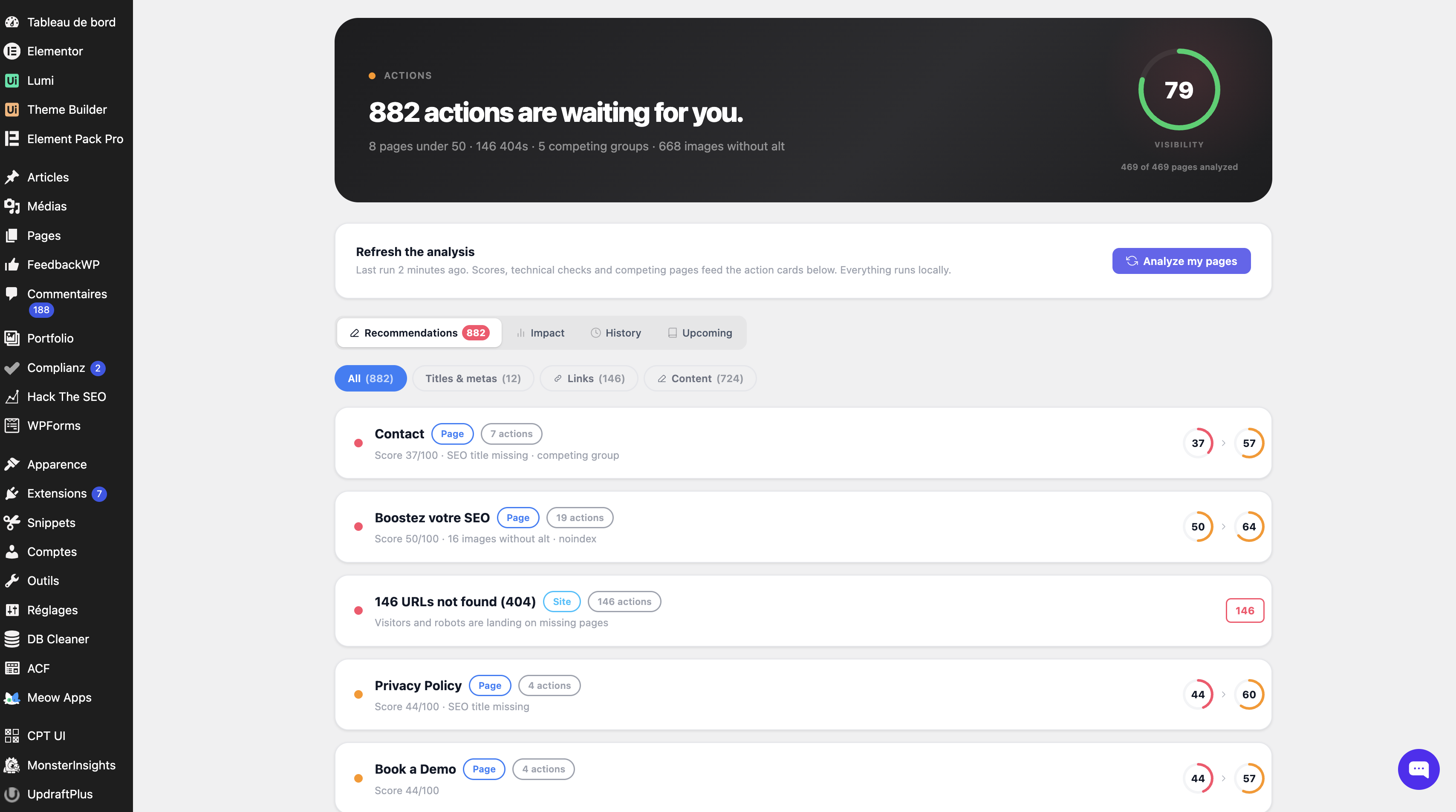
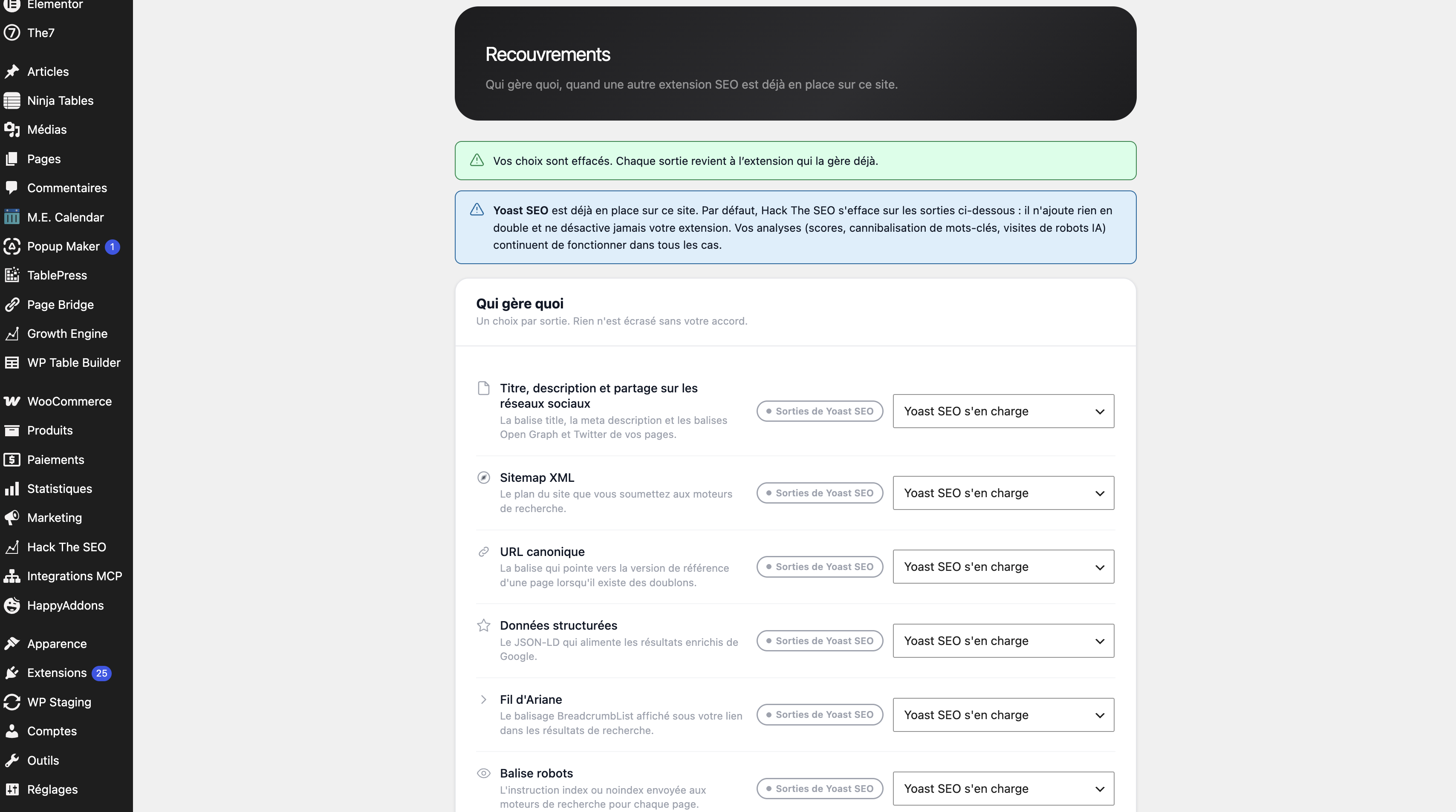

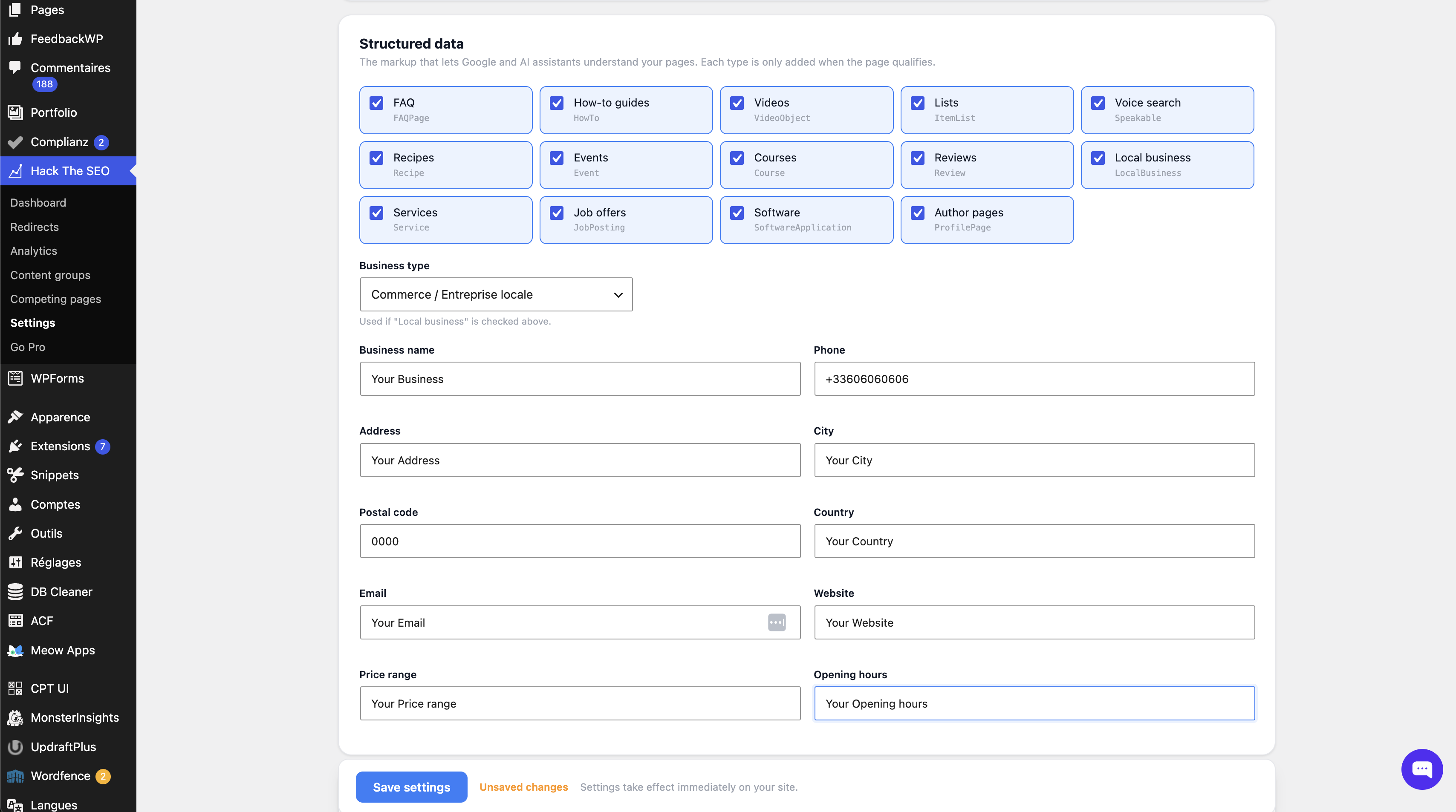
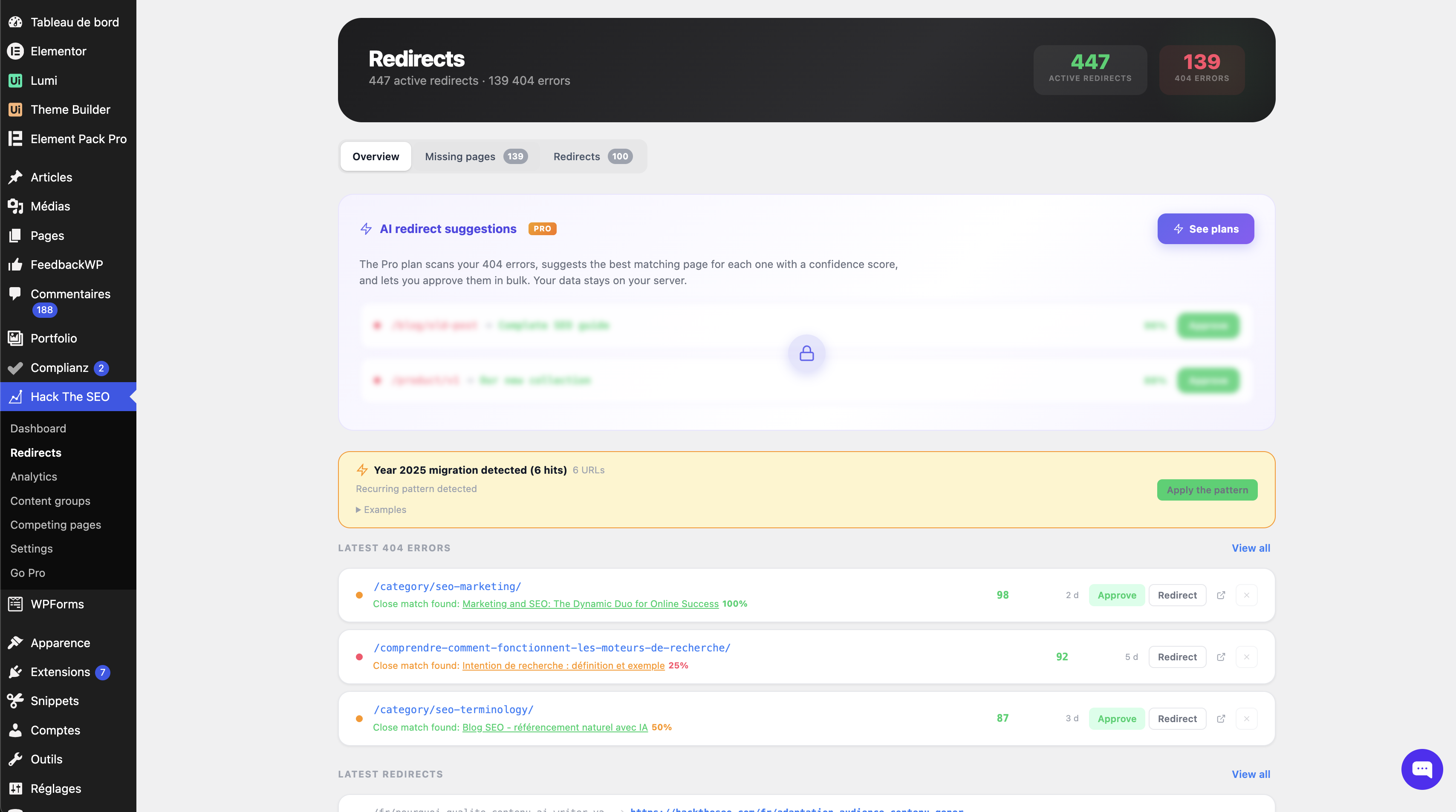
Блоки
Цей плагін надає 1 блок.
- Breadcrumbs
Встановлення
From your WordPress admin
- Go to Plugins > Add New.
- Search for Hack The SEO.
- Click Install Now, then Activate.
Manual installation
- Download the ZIP file.
- Go to Plugins > Add New > Upload Plugin and select the ZIP.
- Click Install Now, then Activate.
- Or, over FTP, upload the
hack-the-seofolder to/wp-content/plugins/and activate it from the Plugins screen.
After activation
- Open the Hack The SEO menu. The “First steps” checklist adapts to what your site still needs and disappears once you are done.
- Already running another SEO plugin? Nothing to do: Hack The SEO detected it and stepped aside. The Compatibility screen shows you who handles what.
- Want to replace it instead? Run the Migration screen before deactivating it. Import first, deactivate second.
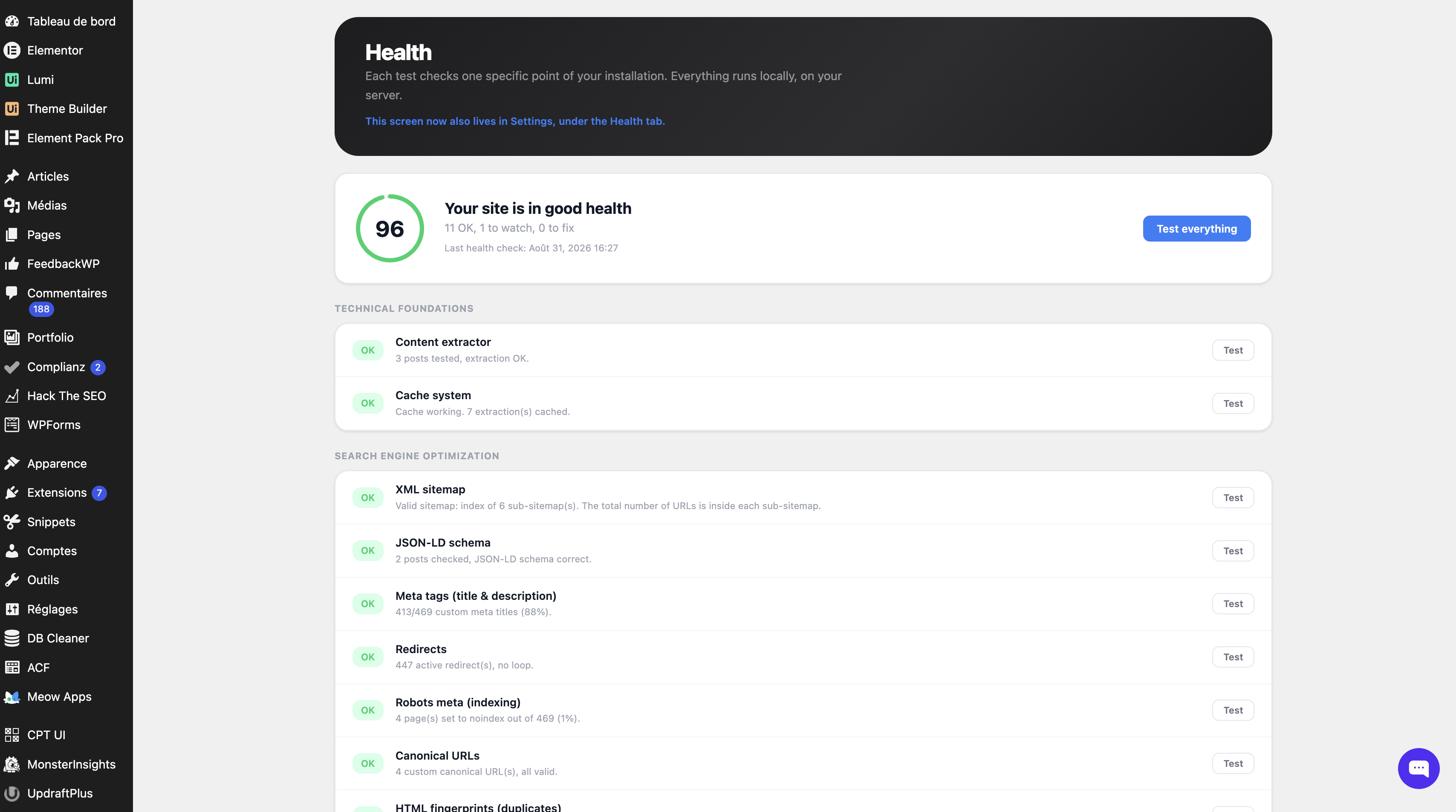
- Check Health to confirm your sitemap and schema are being served correctly.
- Submit
/sitemap.xmlto Google Search Console.
Requirements
- WordPress 5.9 or later (6.9 or later for the MCP server)
- PHP 7.4 or later
- No account, no API key, no subscription.
Часті питання
-
Do I really need another SEO plugin?
-
Only if something is missing. If Yoast or Rank Math is doing the job and you have no idea whether ChatGPT reads your pages, install this one for that answer alone: the AI crawler log, the GEO score and the cannibalization report are things the big four do not give you. And you do not have to choose, see the next question.
-
Can I run it alongside Yoast, Rank Math, All in One SEO or SEOPress?
-
Yes, and that is the default behaviour. You do not have to choose.
On activation the plugin detects the SEO plugin already in place and stops emitting whatever that plugin handles: meta tags, canonical, schema, sitemap, breadcrumbs, robots, and hreflang when a multilingual plugin owns it. So there are no duplicate title tags, no duplicate canonicals and no duplicate schema. It never deactivates your plugin and never touches its settings.
Meanwhile the three things the big four do not give you keep working, because they produce no front-end output and therefore cannot conflict: the AI crawler log, the GEO score per page, and the keyword cannibalization report.
A dedicated screen lists every overlap and lets you take back any module, one by one. Your choice always wins over the automatic default.
If you would rather replace your current plugin than run both, the migration wizard imports its data first, as a dry run you can review. See “How do I switch from Yoast SEO, Rank Math, All in One SEO or SEOPress?” below.
-
How do I see which AI crawlers visit my site?
-
Activate the plugin and open the AI visibility screen. Every request from GPTBot, ChatGPT-User, OAI-SearchBot, ClaudeBot, Claude-User, Claude-SearchBot, PerplexityBot, Perplexity-User, Applebot, CCBot and eight more is recorded server-side, with the URL and the timestamp, in your own database. Nothing is sent anywhere.
To prove it to yourself in ten seconds:
curl -A GPTBot https://your-site.tld/any-page/, then refresh the screen. The row is there.A JavaScript analytics tool cannot do this. AI crawlers do not run JavaScript, so whatever your analytics says about GPTBot, it is guessing.
-
What is in the weekly report, and who sends it?
-
Your own site sends it, through WordPress, to the administrator email. Once a week: how many times AI crawlers read the site and on how many pages, how many visitors arrived from an AI chat, which new broken links appeared, and how the site score moved. Nothing is sent on a week with nothing to report. It is off by default, switched on from the AI visibility settings, and every email carries a one-click unsubscribe link that works without logging in. No third party is involved and no outbound call was added: it is
wp_mail(), the same function WordPress uses for password resets. -
How do I connect Claude to my WordPress site?
-
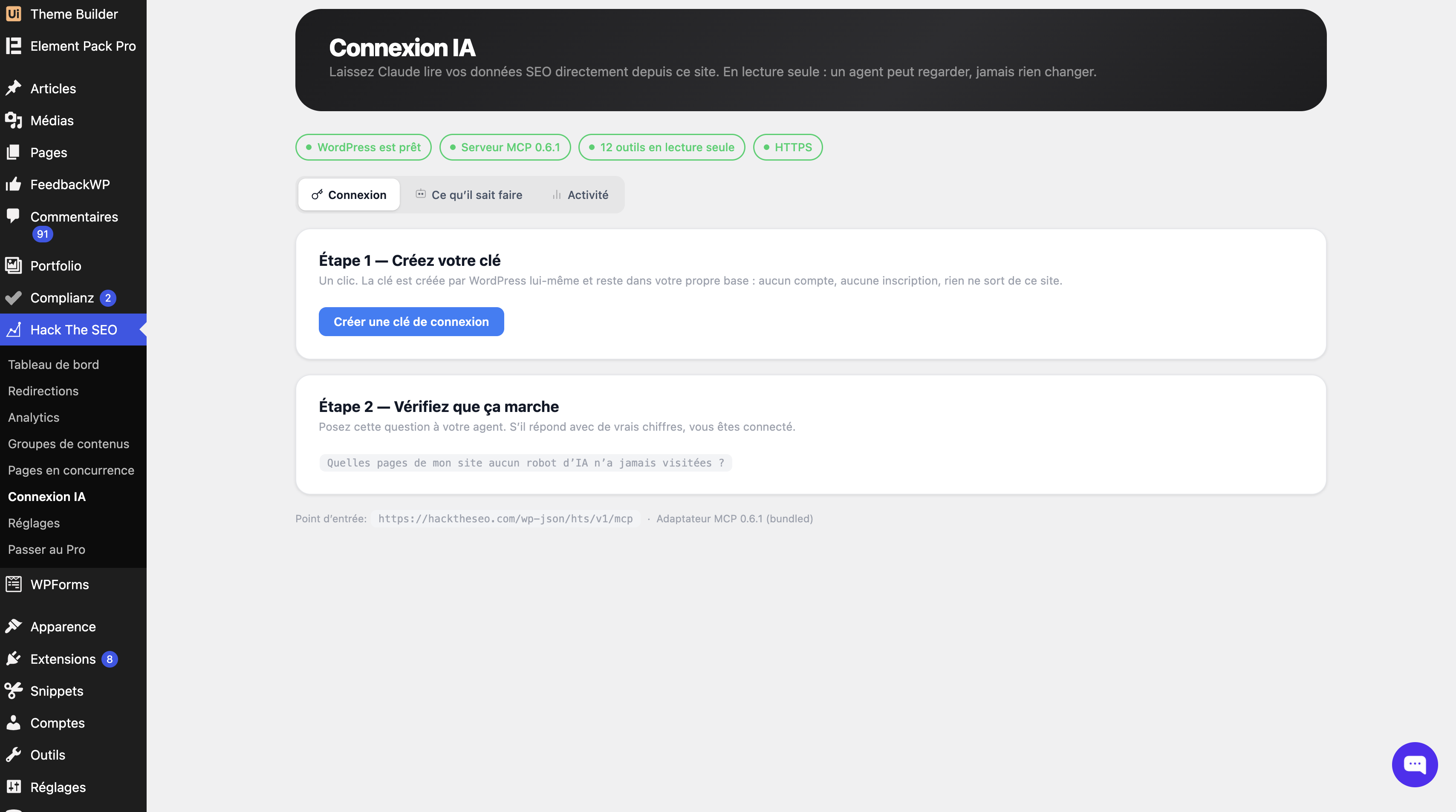
Open the AI connection screen. One button creates a WordPress application password and prints the line to paste into your client. Paste it, and the client talks to
https://your-site.tld/wp-json/htsfree/v1/mcp. No account, no OAuth relay, no companion plugin, nothing installed outside WordPress.Two things are required, and the screen tells you if either is missing: WordPress 6.9 or newer, because that is where the Abilities API entered core, and HTTPS, because WordPress only issues application passwords over a secure connection.
-
What can an AI agent read, and can it change anything?
-
It can read twelve things and change nothing. There is no write among the twelve abilities, and no setting that turns one on.
It reads: AI crawler activity three ways (totals per bot, the detail page by page including the pages no crawler has touched, and the day-by-day timeline), a page’s GEO, on-page and meta scores, the site-wide score distribution, the competing-pages report, your redirect rules, your 404 log, your
llms.txt, the Markdown of any page, and the health check.Every call is made by a signed-in WordPress user and checks a capability: administrator for the site-wide readings, and a user who can edit posts for the four that concern a single page. Unpublished and password-protected content stays out, and no visitor’s IP, referrer or user agent is ever returned. Delete the application password from your user profile and that client is locked out immediately.
-
What is the Model Context Protocol (MCP), and does WordPress support it?
-
The Model Context Protocol is the open standard an AI client uses to read data from a tool, instead of you copying and pasting it. WordPress 6.9 brought the Abilities API into core, and this plugin builds a read-only MCP server on top of it at
/wp-json/htsfree/v1/mcp.Twelve abilities, and all twelve read. Point Claude Code or Claude Desktop at it and ask about your own site: which published pages no AI crawler has read, why an article scores 38 out of 100, which of your pages compete with each other. The connection is inbound, so your client calls your site and no third party is contacted. Below WordPress 6.9 the server simply does not register.
-
Does the MCP server send my data to OpenAI or Anthropic?
-
The MCP server sends nothing and contacts no third party. Your AI client calls your site, not the other way round. What you then read inside your client goes wherever that client goes, which is between you and the client you chose, exactly as if you had typed the same figures in by hand.
On the plugin’s side the MCP server changed nothing: it added no
wp_remote_call site of its own, and neither does the bundled library. If another plugin has already loaded the same MCP library in an older version, this server stays off rather than fight over it, and the AI connection screen says so plainly. -
What is the best free SEO plugin for WordPress?
-
That depends on what you need, and anyone giving you a single answer is selling something. Yoast SEO and Rank Math are the two largest and have the biggest ecosystems. All in One SEO is the oldest. SEOPress is the leanest of the big four. Slim SEO is the right answer if you want zero configuration.
Hack The SEO is built for a specific case: you want the whole technical layer (schema, sitemap, redirects, canonical, robots, breadcrumbs) plus keyword cannibalization detection and real AI-crawler measurement, computed locally, with no account and none of it sent to a third party. If cannibalization or GEO measurement is what you are missing, this is the free plugin that has it, and it runs next to whichever of the others you already use. If you mostly want AI-generated content, it is not.
-
How do I add schema (JSON-LD) to WordPress?
-
Install Hack The SEO and it generates JSON-LD structured data automatically from what is already on each page: Article, BreadcrumbList, Organization, Person, Product, FAQPage, HowTo, QAPage, VideoObject and 60+ types in total, so your pages qualify for rich snippets. Types that cannot be detected reliably, such as LocalBusiness opening hours, are yours to enable per page in the Schema settings, so nothing is invented. Confirm the result in Google’s Rich Results Test or the Schema Markup Validator.
-
How do I create a 301 redirect in WordPress?
-
Open the Redirects screen, enter the old URL and the destination, and choose 301 (permanent). You can also use 302, 307 and 410, add regex rules for bulk migrations, and import or export everything as CSV. When you rename a post, a 301 from the old slug is created for you. Incoming 404s are logged, and any 404 can be turned into a redirect in one click. Redirects are served in PHP, so your
.htaccessis never touched and it works identically on Apache, Nginx and LiteSpeed. -
How do I generate an XML sitemap for WordPress?
-
It is served automatically at
/sitemap.xml: a sitemap index plus one sitemap per content type, with image, video and news extensions and an XSL stylesheet so it is readable by a human. It respects noindex and is cached on disk so it does not rebuild in PHP on every request. Submit/sitemap.xmlto Google Search Console. The “First steps” checklist reminds you to. -
What is llms.txt, and how do I add it to WordPress?
-
llms.txt is a plain-text file listing your key content for AI crawlers, in the same spirit as
robots.txtfor search crawlers. Hack The SEO serves it virtually at/llms.txt, generated from your real content, with no file written to disk. It also serves a Markdown version of every page at/your-page.md, which is the format an LLM parses most reliably and most cheaply. Both are on your own server, both are free, and neither requires an account. -
What is GEO (generative engine optimization) and AEO?
-
GEO, sometimes called AEO (answer engine optimization), means making your content easy for generative engines (ChatGPT, Claude, Perplexity, Gemini, Google AI Overviews) to read, understand and cite. Classic SEO optimises for a ranked list of links; GEO optimises for being the source quoted inside an answer.
In practice it comes down to: answer the question explicitly and early, keep facts stable and attributable, structure the page so a machine can parse it, expose clean formats (schema, Markdown, llms.txt), and then measure whether the AI crawlers actually come. Hack The SEO does all five, locally, in the free version.
-
What is keyword cannibalization, and how do I fix it?
-
Keyword cannibalization is when two or more of your own pages target the same query, so search engines have to pick between them and both underperform. It is one of the most common causes of a site that has plenty of content and no rankings.
Hack The SEO detects it for free: it compares focus keywords and title similarity to find competing pairs, measures how much their content actually diverges, and recommends what to do with each pair: merge them, differentiate them, redirect one into the other, or leave them alone because they genuinely serve different intents. All computed in PHP on your server, with no embeddings and no external API.
-
How do I get my content cited by ChatGPT, Perplexity or Google AI Overviews?
-
Nobody controls that, and any tool claiming otherwise is guessing. What you can control is whether your content is citable, and whether the engines are even reading it.
Being citable means: answering the question explicitly and early on the page rather than after four paragraphs of preamble; stating facts that can be quoted and attributed; keeping a clean, parseable structure; and exposing formats a model reads cheaply: valid JSON-LD schema, a Markdown version of the page, an
llms.txtindex. Hack The SEO’s GEO score checks the first three and generates the last two.Then you measure. The AI visibility screen tells you whether GPTBot, ClaudeBot, PerplexityBot and the rest actually came, on which URLs, and how often. Very few free plugins give you that, and without it you have no way of knowing whether any of the rest is working.
-
How do I find and fix 404 errors in WordPress?
-
Every 404 hit on your site is logged automatically, with the requested URL, the referrer and a hit count, so you can tell a real broken link from a bot probing for
/wp-admin/setup.php. Sort by hits, and the URLs actually costing you traffic come straight to the top. Each row has a one-click “redirect this” action that turns the 404 into a 301 to wherever you choose. The log is capped and self-cleaning, so it cannot grow until it hurts your database. -
Does it work with Google Search Console and IndexNow?
-
The XML sitemap at
/sitemap.xmlis what you submit to Google Search Console, and the “First steps” checklist walks you through it. IndexNow is built in and optional: turn it on, and Bing, Yandex, Naver, Seznam and Yep are notified the moment you publish or update a URL, rather than waiting for a crawl. It is off by default and sends nothing but the URL, your host name and your IndexNow key. See “External services”. -
How do I switch from Yoast SEO, Rank Math, All in One SEO or SEOPress?
-
You do not have to: the plugin runs next to them. But if you want to, install Hack The SEO while the other plugin is still active, open the Migration screen, and run the import. It reads meta titles and descriptions, meta robots, canonical URLs, focus keywords, cornerstone/pillar flags, redirects and Open Graph fields. If the previous plugin emitted its schema through the theme or a page builder rather than storing it, the wizard parses your rendered homepage to recover Organization and LocalBusiness data.
Then verify a few pages, then deactivate the other plugin. Import first, deactivate second, in that order. The wizard never deletes the source data, so the move is reversible.
-
Will it slow down my site?
-
No. Front-end output is meta tags, JSON-LD and, if you enable them, breadcrumbs, all built during the normal page render. The XML sitemap is cached on disk rather than rebuilt in PHP. Scores, cannibalization and health checks run in the admin or on cron, never on a visitor’s request. AI crawler detection is a User-Agent read on a hook that already runs. There is no external HTTP call in the front-end path, which is worth stating explicitly: a plugin that calls a remote API while rendering your page is at the mercy of that API’s latency. This one has nothing to call.
-
Does this plugin send my data anywhere?
-
Not on its own. Out of the box it makes zero outbound requests, and it never starts one by itself. Two features can contact a third party, and each of them waits for you.
IndexNow, which you switch on yourself. When enabled, it sends the URL you just published, your host name and your IndexNow key to
api.indexnow.org. While it is off, which is how it ships, no hook is even registered.The opt-in form, if you type your email address and tick the box to receive the guide and the newsletter. It then sends that address to
hacktheseo.com, along with your consent, the version of the wording you agreed to, the wordwp-plugin-free, the plugin version and your site language, and from there the address goes to Klaviyo, the mailing service. The body of that request says nothing about your site, and the plugin sets its own User-Agent header rather than the WordPress default, which carries the site address. So the site address is not sent either. Leave the form alone and nothing is ever sent.Nothing else is sent to a third party. Both are described field by field under “External services”.
The weekly report is an email your own WordPress sends to you, through the mail setup your site already has. It is not a call to us.
Some features do load pages of your own site over HTTP, to verify that your sitemap answers and your schema is really in the rendered HTML. Those requests go to your domain, not to us.
That is the whole story, and you can verify it: grep the plugin for
wp_remote_and read the call sites yourself. There are ten. Two are IndexNow. Seven load a page of your own site, to read it back the way a crawler would: three in the health check, and one each for structured data, page builder detection, content extraction and redirect testing. The tenth is the opt-in form, and it runs only when you submit it. -
Is it GDPR compliant?
-
The plugin sets no cookie and loads no third-party script. Nothing about your visitors ever leaves your site: the on-site content performance module counts views, reading time and scroll depth in your own database, visitor IP addresses are never stored, only hashed as a short-lived rate-limit key, and the module can be switched off. The one piece of personal data the plugin can transmit is your own email address, and only if you type it into the opt-in form and tick the box; it then goes to Hack The SEO and to Klaviyo, and you can withdraw it from any email they send you. As always, GDPR compliance is a property of your whole site, not of one plugin. Leave the opt-in form alone and this one gives you nothing to declare.
-
Do I need an account to use it?
-
No. Every SEO feature described on this page runs locally: no key to paste, and nothing that stops working because a server somewhere is down. The plugin does offer one sign-up, for a guide and a newsletter, in a form you are free to ignore. It is not an account, and nothing in the plugin depends on it.
-
Does it guarantee I will rank better on Google?
-
No, and be suspicious of any plugin that says otherwise. Ranking depends on your content, your market and factors nobody controls. What this plugin does is make sure the technical layer is correct and give you honest measurements. That is a prerequisite, not a promise.
-
Does it work with WooCommerce?
-
Yes. Product pages get Product, Offer and AggregateRating schema where the data genuinely exists, product categories are handled by the sitemap and the permalink options, and product rows in the posts list show an exempt state rather than an editorial score that would mean nothing for a product.
-
Does it work with Elementor, Divi, Bricks, Oxygen or WPBakery?
-
Yes. The plugin detects the builder and reads the rendered content rather than the raw
post_content, so the scoring, the schema and the Markdown output all see the same text your visitors see. -
Does it work with caching plugins and CDNs?
-
Yes. Everything on the front end is standard WordPress output, so it caches like the rest of your page. Redirects are evaluated early, on
template_redirect. A full-page cache drop-in can still answer before WordPress loads any plugin, so clear your cache after adding a rule. The sitemap has its own disk cache. Nothing depends on a request reaching PHP uncached. -
Does it work on multisite?
-
Yes. Each site keeps its own settings, redirects, sitemap and data.
-
How do I add alt text to images in WordPress?
-
Alt text is the sentence a screen reader announces and a search engine reads in place of the image. Hack The SEO fills in the missing ones automatically when you save a post, deriving the text from the file name, the post title or the focus keyword, and never overwriting alt text you wrote yourself.
The audit screen lists every image still without one, so you can fix the ones that matter by hand. Images with no alt text are also one of the criteria of the on-page score.
-
How do I edit robots.txt in WordPress?
-
Open the SEO settings and write your rules in the robots.txt box. Hack The SEO serves the file virtually, through WordPress core’s own
robots_txtfilter, so nothing is written to disk. If a physicalrobots.txtfile already sits at the root of your site, your server answers with that one instead and the screen tells you so: a file on disk always wins over anything PHP can produce.Two things worth knowing before you block an AI crawler there:
robots.txtis a request, not a wall, and this plugin never adds a blocking rule for you. It measures which crawlers came; what you allow is your decision. -
How do I noindex a page or post in WordPress?
-
Open the Hack The SEO panel on any post, page or custom post type and switch on “noindex”, and “nofollow” if you need it. The plugin outputs a single, correct robots meta tag and keeps that URL out of your XML sitemap. Whole archives (author, date, internal search) can be set to noindex from the settings.
-
Switch the Breadcrumbs module on first, then use the
[htsfree_breadcrumbs]shortcode, the “Breadcrumbs” Gutenberg block, or thehtsfree_breadcrumbs()PHP function in your theme. Hack The SEO builds the trail from your category hierarchy and outputs matching BreadcrumbList schema, so your breadcrumbs can appear directly in Google’s results. -
How do I set a canonical URL?
-
Every post and page has a canonical field in the SEO panel. Leave it blank for the automatic self-referencing canonical, or enter a custom URL to consolidate duplicate content. The plugin detects conflicts and never outputs two canonical tags on the same page.
-
Does the plugin write files on my server?
-
Almost nothing. There is exactly one thing written to disk: the generated XML sitemap, cached under
wp-content/uploads/hts-cache/sitemaps/so a cold request does not have to rebuild it in PHP. That is the complete list. In particular:- No redirect is ever written to your
.htaccess. Redirects are served in PHP, on Apache, Nginx and LiteSpeed alike. The only time the file changes at all is when WordPress refreshes its own# BEGIN WordPressblock: the plugin asks core for a rewrite refresh on activation, on update, and when you change a permalink option, exactly as Settings > Permalinks does. Nothing of ours is added to the file, and it is left alone entirely when it is not writable. robots.txtis not written to disk. It is served virtually, through WordPress core’s ownrobots_txtfilter.llms.txtis not written to disk either.- Nothing is ever written outside
wp-content.
- No redirect is ever written to your
-
What happens to my data if I uninstall?
-
By default, nothing is deleted. Your redirects, your 404 log, your metadata and your settings stay in the database; only transients and scheduled tasks are cleaned. This is deliberate: someone who uninstalls and reinstalls should not lose the 301s holding their site together. If you genuinely want everything gone, enable the “delete my data on uninstall” option first.
-
Why is part of the interface in French?
-
It should not be any more. The plugin is developed in France and is fully internationalised; the interface follows your site language automatically. English, French, Spanish, German, Italian and Brazilian Portuguese ship with the plugin. Further translations are handled through translate.wordpress.org. If you still see French on an English site, tell us on the forum with the screen name: that is a string we missed.
-
Is there a paid version?
-
Yes, and it is a separate product. Everything on this page works in the free version, permanently, without an account.
Hack The SEO also has a commercial version, which adds automated internal linking and semantic cocoons, AI-assisted content workflows, and a hosted dashboard. It is a separate product and is not required for anything described here.
The free version is not a trial and does not expire. If you ever move to the commercial version, the work you did page by page comes with you: your meta titles and descriptions, your canonical and robots choices, your redirects and your scores are stored in shared keys and are read as they are. The free plugin’s own settings, such as which modules you switched on, are stored separately and are set again in the other plugin. Details at hacktheseo.com.
Відгуки


Учасники та розробники
“Hack The SEO – AI Bot Tracker, GEO Score, JSON-LD Schema & Cannibalization” — проект з відкритим вихідним кодом. В розвиток плагіну внесли свій вклад наступні учасники:
Учасники
Цікавитесь розробкою?
Перегляньте код, перегляньте сховище SVN або підпишіться на журнал розробки за допомогою RSS.
Журнал змін
1.1.12
- Changed: the guide offer now appears on the dashboard from day one, instead of waiting a week. It showed up straight away on the AI crawlers screen only, so anyone who never opened that screen saw nothing for seven days. Every other screen is unchanged, and so is every way of saying no: “Not now” still silences it for fifteen days, “Do not show this again” still ends it for good, and it still steps aside when the review request is due.
1.1.11
- Changed: the milestone card now looks like the rest of the plugin. It used the amber of a warning, which made a piece of good news read like a problem. Same violet as everything else, and half the words: the sentences said in three lines what the screen underneath already shows.
1.1.10
- Fix: saying “Not now” to the guide offer now silences it on the AI crawlers screen too, for the same fifteen days it already applied everywhere else. It used to quiet only the floating card, so the offer sitting inside that screen came back on every single visit: a refusal counted for one surface out of two, and nothing told you so.
- Fix: the “How to check right now” box gave you a curl command pointing at your home page. On a default WordPress install the home page lists your posts, and detection only runs on a single post or page, so the command recorded nothing: you followed the instruction on the first screen after activation and concluded the module was broken. It now points at your most recent published content.
1.1.9
- Added: the AI connection screen now says what the connection is for before asking you to create a key. It opened on “Step 1, create your key”, which is a set of instructions for something it had never named. Three tiles now answer it in a line each: ask a question about your own site instead of hunting for the answer, get your own figures rather than general advice, and nothing can be changed because every tool on the connection is read-only.
- Added: the same screen now walks you through it, tool by tool. Pick yours from Claude Code, Claude Desktop, Cursor, Windsurf and ChatGPT, and you get its line, three numbered steps and how to tell it worked. Before, every tool’s instructions were stacked on the same page and you read the other four before finding yours.
- Fix: the screen said ChatGPT could not use this connection. That was wrong. The ChatGPT desktop app does accept a key carried in a header, in its own configuration file, and it now has its own block and its own steps like every other tool. What is true, and the screen now says so on the first step, is that this does not work on chatgpt.com in a browser.
- Changed: the Claude Code line now registers your site for your whole account rather than for the single folder the command was typed in. Run from anywhere else, the old line left Claude Code answering that no server was configured, with nothing to explain why.
- Changed: the guide is now offered on the AI crawlers screen itself, under the figures, from the day you install the plugin. The floating card that carried the offer waits a week before it appears, so on a fresh install the only place it showed up was the first-steps list, which is not where the question comes up. The card keeps every other screen; it simply stops competing with the offer now sitting inside this one.
- Changed: once you have asked for the guide, or said you do not want it, the offer disappears everywhere, the first-steps list included. That step used to stay struck through for good. A completed setup step is worth showing; an offer already taken up is just a line that never goes away.
- Fix: two pages with nothing in common were reported as competing for the same keyword. WordPress stores a curly apostrophe, a dash or French quotation marks as a code rather than as the character itself, and the comparison was reading those codes as if they were words. Two French pages both containing an accent and a pair of quotation marks therefore shared three invented words, which was enough to pair them. Worse, an accented word was cut in two and vanished from the comparison entirely. Pairs already recorded this way are removed once, on update, unless you had already decided something about them, in which case your decision is kept.
- Added: the AI crawler figures are now split by what each robot came for. A robot collecting text to train a model, a robot feeding a search index, and a robot fetching the page right now to answer somebody’s question are three different things, and only the last can put you in an answer a visitor reads. Measured on two unrelated sites, the purposes that answer nobody accounted for about nine tenths of the total, so a single total invited the conclusion that your AI visibility was ten times what it is. The total is unchanged and still there; the split sits beside it, and hits from a robot we cannot identify are counted separately instead of being spread across the three.
- Added: the first-steps card now has a step for the guide. Its button opens the form in a dialog box rather than sending you to another screen, and a grey “Mark as done” next to it puts the step away for anyone who is not interested. The step disappears entirely for anyone who has asked not to be offered the guide again.
- Changed: both cards now use the full width of the screen, like every other notice in the admin. They were capped at 760 pixels and floated in the middle of a wide screen. The text itself is still capped, at around 65 characters a line, because that is what makes it readable.
- Changed: the “Leave a review” button keeps its white, bold label whatever the rest of the admin does to links.
1.1.8
- Fix: two different cards could ask you for something on the same screen. The card offering the guide and the one asking for a review used the same rule about where to appear, with nothing deciding between them, so the day you crossed a milestone both turned up one under the other. Two requests stacked are not two chances, they are two refusals. Only one appears now, and the review goes first: it only fires on a milestone you actually reached, once, and it goes stale, while the other card has every other page to itself.
- Changed: the card offering the guide now starts on the AI crawlers screen. That screen shows you what GPTBot and ClaudeBot did on your site, and the guide answers the question that screen just raised; anywhere else it interrupts something unrelated. If you do not go there, it appears everywhere after three plugin screens, so nothing is lost by not visiting it.
- Changed: both cards were redrawn. The guide carries a white-paper cover and the indigo the plugin uses everywhere it talks about AI visibility; the review request carries the amber of its own stars. They no longer look like a WordPress error message, and you can tell which is which before reading either.
- Changed: the guide card’s send button no longer looks broken while it waits. It stays dimmed until you tick the consent box, then lights up, instead of sitting there greyed out with nothing saying why.
- Fix: the review card’s button showed blue text on a blue background on some setups, because a link rule from the admin overrode the button’s own colour. Its label is white in every state now.
1.1.7
- Fix: the author profile screen was written in English and could not be translated. Eleven field labels, from “Job Title” to “GitHub URL”, were fixed in the code rather than passed through the translation system, so a French, German, Spanish, Italian or Brazilian site showed an English form. It went unnoticed while few people found that screen; the new first-steps card now sends you there on purpose, from a step written in your own language. The labels are translated in all five languages.
- Changed: the interface is fully translated again in French, German, Spanish, Italian and Brazilian Portuguese, including everything added by the new first-steps card.
1.1.6
- Changed: the first-run experience has been rebuilt. Until now the dashboard offered a banner and a card that proposed the same thing, one above the other, and the card itself held nothing but a button. There is one call to action at a time, and the card is now the list of what is left to do: a progress bar, a count, one line per step with what it is for and a button that takes you there, and the line struck through once it is done.
- Fix: one of those steps said to add your logo and your social profiles, and sent you to a screen that has no logo field. The logo comes from your theme, not from this plugin. The step now describes what the screen actually offers.
- Changed: the end of the setup no longer runs everything together. The block listing what is already active has room to breathe, and the line that offers to analyse your pages no longer touches it.
- Changed: the card offering the guide appeared under the last button, and only after you pressed Save, so it arrived by surprise once the page was already finished. It now sits in the flow of the recap, and the button that ends the setup is the last thing on the page again.
1.1.5
- Changed: the line under the form said your address went to hacktheseo.com and Klaviyo, and that nothing else was sent. It meant the request carries nothing but your address, no site address and no measurement, and it is written that way on this page where the six fields are listed just above. Under a box that offers a newsletter, read quickly, it says the opposite: that we will not write to you again. It now names the two services and stops there, and the detail stays one click away in the privacy policy.
- Changed: the card can now be turned down two ways. “Not now” hides it for fifteen days instead of sixty. “Do not show this again” hides it for good. In both cases the form stays where you can find it, at the bottom of the Settings screen, because turning down an interruption is not the same as giving up the guide.
- Fix: the link to the privacy policy opens in a new tab so you do not lose what you typed, but nothing told people using a screen reader that it would. It now says so, the way WordPress itself does.
1.1.4
- Changed: the form that offers the guide has been rewritten and redrawn. It opens on a question rather than on a description, and it now looks like the rest of the plugin instead of like a WordPress error message: a title, one sentence, then the address field and the button side by side, the consent box on its own line, and the legal note in small grey type underneath.
- Added: the form also lives at the bottom of the Settings screen, permanently. Someone who said no the first time, or who wants the guide three months later, had no way of finding it again. The card at the top of the screens still appears once and still never comes back.
- Added: the form appears at the end of the first-run walkthrough, the moment someone has just seen what the plugin measures. It is not shown there to anyone who has already asked for the guide, and it never stands between you and the end of the walkthrough.
- Fix: a site could only ever request the guide once. A second request was answered with the same success message without anything being sent, so a site with several administrators, or anyone who mistyped their address the first time, was stuck with no way to correct it. Requests are no longer refused on that basis.
- Fix: this page said your site address travelled in the standard technical header of the request. That was true when it was written and it is no longer: the plugin now sets its own header, so the site address is not sent at all. The sentence has been corrected rather than left to declare more than what happens.
- Changed: the dashboard and the walkthrough said the analysis “sends no data anywhere”. The analysis still sends nothing, but that sentence sat ten lines above a form that sends an email address, and an absolute in that position reads as a contradiction whatever it actually means. It now says what the analysis does, without the absolute.
1.1.3
- Added: an optional form to receive a short guide on how AI assistants read a WordPress site. You type your address and tick a box, and nothing happens at all unless you do both. The address goes to hacktheseo.com, which passes it to Klaviyo, the service that sends the emails. Nothing else is sent: not your site address, not your name, not one measurement. You are then sent a confirmation email, and you are subscribed only after you click it, so an address typed by mistake, or typed by somebody else, never receives anything.
- Changed: the plugin description and four screens no longer say that nothing ever leaves your site. That sentence was true, and it stops being true for anyone who uses the form, so it has been replaced by what stays true: the SEO work is computed on your own server, and every request the plugin can make waits for you to start it.
- Changed: the “External services” section of this page now declares hacktheseo.com and Klaviyo next to IndexNow, names the six fields that are sent, and links to both privacy policies.
- Fix: this page invited you to count the outbound call sites yourself and said there were nine. There were eight. There are nine now, and the breakdown is written out, so the count can be checked in a minute.
- Changed: the form never appears in the preview sandbox on wordpress.org, where every visitor is signed in as an administrator, and it never appears on the settings screen.
1.1.2
- Changed: the dashboard widget now draws the week. Seven bars, one per day, with the busiest crawler names underneath and the difference with the previous week. A day with no visit keeps a thin grey line rather than disappearing, because a missing column reads as missing data and not as a zero. Same figures as before, read in a second instead of a sentence.
- Changed: the two notices about your other SEO plugin no longer describe a risk that this plugin prevents. They said your indexing settings, your canonicals and your redirects “would be lost” without an import, and asked you to import “before uninstalling it”. Neither is true since 1.1.0: Hack The SEO steps aside wherever another SEO plugin is in charge, so nothing is lost and nothing has to be uninstalled. They now say what the import actually gives you, that your other plugin keeps running and is not modified, and that the import can be undone.
- Changed: the reminder that appeared after a week no longer counts the days since detection. A number of days is not information, it is pressure, and the action it pushed towards is optional.
1.1.1
- Added: a dashboard widget, “AI crawlers this week”. Until now the plugin only existed inside its own menu: an administrator who did not open that menu never saw the product again after installing it. The widget shows how many times AI crawlers read the site over the last seven days, how that compares with the week before, and which crawlers came. It reads the log that is already in your database, adds no query to the front end, and carries no promotion.
- Fix: the “Go Pro” link on the Plugins screen pointed at a page that returns 404. It is the one link the plugin shows outside its own menu, so every click on it was lost. It now points at the pricing page.
- Fix: the notice that tells you your import is done and that you may keep both plugins was never displayed. It was written and translated, but the function that renders it was not attached to anything, and the condition governing the second half read a setting that no file in this plugin ever writes. Both are corrected, and the notice is confined to the plugin’s own screens and the Plugins screen.
- Changed: the review request now reaches sites it could never reach before. It asked for a review after 50 AI crawler visits, 15 redirects or 10 pages scoring 80, thresholds a small site may take months to cross, so on a new install the invitation could simply never appear. A new step opens on the first AI crawler visit, for three weeks, and only after the numbered milestones have been checked, so it never replaces a sentence carrying a real figure. The invitation also waits seven days after installation, and it now offers the support forum to anyone for whom something is not working, without ever hiding the review link.
- Added: the plugin records its installation date, once, at activation. Without it no rule of the form “and at least so many days after installing” could be written at all.
- Fix: the description said that moving to the commercial version picks your data up exactly as it is. That is true of the work you do page by page, which is stored in shared keys, and it is not true of this plugin’s own settings, which are stored under their own names. The sentence now says which is which.
1.1.0
- Added: a read-only MCP server, at
/wp-json/htsfree/v1/mcp. Claude Code, Claude Desktop and other MCP clients can read what the plugin measures: AI-crawler passages by page and over time, GEO, on-page and meta scores, the site-wide score distribution, the competing-pages report, redirects, the 404 log, llms.txt, the Markdown of a page, and the health check. Twelve abilities, and all twelve read: there is no write among them, and no setting that turns one on. It needs WordPress 6.9, where the Abilities API entered core; below that it does not register and nothing else changes. - Added: the plugin now runs next to Yoast SEO, Rank Math, All in One SEO and SEOPress. On activation it detects the SEO plugin already in place and stops emitting whatever that plugin handles (meta tags, canonical, schema, sitemap, breadcrumbs, robots, and hreflang when a multilingual plugin owns it), so nothing is output twice. It never deactivates the other plugin and never changes its settings. A Compatibility screen lists every overlap and lets you take back any module, one by one. The AI crawler log, the GEO score and the cannibalization report have no front-end output and work regardless.
- Added: a weekly report by email. Once a week your own site sends its administrator a short message: how many times AI crawlers read the site and on how many pages, how many visitors arrived from an AI chat, which new broken links appeared, and how the site score moved. Nothing is sent on a week with nothing to report, every email carries a one-click unsubscribe link that works without logging in, and the report can be switched on or off from the AI visibility settings. It is sent by your own site through WordPress, so no third party is involved and no outbound call was added.
- Added: an “AI connection” screen. One button creates the WordPress application password and prints the line to paste into your client. The screen lists the twelve abilities with the capability each one needs, shows which client connected and when, and keeps the last fifty calls with their duration. It records what was called, never the arguments and never the answers.
- Added: the interface ships translated into French, Spanish, German, Italian and Brazilian Portuguese. Until now nothing loaded them: WordPress reads a plugin’s own catalogues only when the plugin points at them, and otherwise waits for a package from translate.wordpress.org, of which none exists yet for this plugin. Both halves are fixed. Your site language is followed automatically, with no account and no setting to change. An official package, the day it exists, takes precedence on its own.
- Changed: every link leaving the plugin now goes through a single point, so it is possible to tell which screen sends people to the site and which one converts. The dashboard previously wrote tracking parameters onto an internal admin URL, where no measurement tool can ever read them; internal links now carry the originating screen instead, and the pricing page reads it back onto its outgoing links.
- Added: a way to say what is missing or broken, from the footer of every plugin screen. You write your message, optionally attach a summary of your setup (versions and active modules, never your site address and never a key), copy it, and open the support forum. Nothing is sent from the plugin and nothing is stored: the text never reaches the server, so it is never altered and there is nothing to delete later.
- Security: every MCP call is made by a signed-in WordPress user and checks a capability,
manage_optionsfor the site-wide readings andedit_postsfor the four that concern a single page. An anonymous request cannot even list the tools. No ability returns unpublished or password-protected content, nor a visitor’s IP address, referrer or user agent. - Fix: the crawler report no longer lists a page that has been unpublished or password-protected since a crawler read it. Its rows stayed in the log, so its title could still appear.
- Fix: the “Set up the connection” button in the settings, and the Pro link on the AI connection screen, navigate again. Both were rendered as buttons carrying a link, which does nothing.
- Unchanged: the MCP server added no outbound call, and the bundled MCP library adds none. MCP is inbound: your client calls your site, and no third party is contacted.
1.0.25
- Fix:
Google-ExtendedandApplebot-Extendedhave been removed from the AI crawler list. Neither is a crawler: Google documents that Google-Extended has no separate user agent string, and Apple documents that Applebot-Extended does not crawl web pages. Both were robots.txt tokens, so neither could ever have been detected. Apple is now tracked through its real crawler,Applebot. - Added:
Claude-UserandClaude-SearchBot, Anthropic’s current on-demand and search agents;Perplexity-User, Perplexity’s on-demand fetcher; andGoogle-CloudVertexBot. Eighteen user agents are now matched, up from thirteen. - Removed:
Gemini-BotandCopilotBot, which neither company publishes. Human visits arriving from Gemini and Copilot chats are still measured, through the referrer.
1.0.24
- Fix: updating from 1.0.22 or earlier no longer resets your settings. The rename migration ran after the modules had already written their defaults, so a module you had switched on could come back off.
- Fix: the migration now keeps each setting’s autoload state instead of turning it off. WordPress 6.6 changed the wording stored in that column, and the check missed it, which added one database query per setting on every page.
- Fix:
[hts_breadcrumbs]and[hts_sitemap]written in older posts render again. They were renamed in 1.0.21 without rewriting existing content, so visitors saw the raw shortcode text. - Fix: the rename migration no longer runs when the commercial version is installed alongside. It shares the same setting names, and moving them emptied its data.
- Changed: the breadcrumbs block is now registered as
htsfree/breadcrumbs, and the remaining French labels and untranslatable strings are translated: “Table of contents”, “Breadcrumb”, “Home”, “Other AI”, and the sitemap screen messages.
1.0.23
- Changed: every option and transient the plugin owns now carries the
htsfree_prefix, as the directory requires. Your settings are migrated automatically on update; per-post SEO data is untouched. - Fix: the Author URI now points to the wordpress.org profile, which answers in a second. The previous address took eleven, over the review tool’s timeout.
For the full version history, see changelog.txt.