

Опис
Debug Log Viewer: Ваш основний інструмент для налагодження WordPress
Tired of struggling to access and understand your WordPress debug.log file?
Debug Log Viewer simplifies WordPress debugging by providing a user-friendly interface to view, search, and manage your debug.log directly within your WordPress admin area.
It is designed for WordPress developers, site administrators, freelancers, and anyone who needs to quickly identify and resolve website issues.
Debug Log Viewer helps you find errors faster without using FTP, hosting panels, or manually opening log files.
Отримуйте інформацію про стан вашого сайту WordPress у режимі реального часу
Monitor errors, warnings, and deprecated function notices in real-time. Debug Log Viewer helps you identify problems early and maintain a more stable WordPress environment.
Key Features for Efficient WordPress Debugging
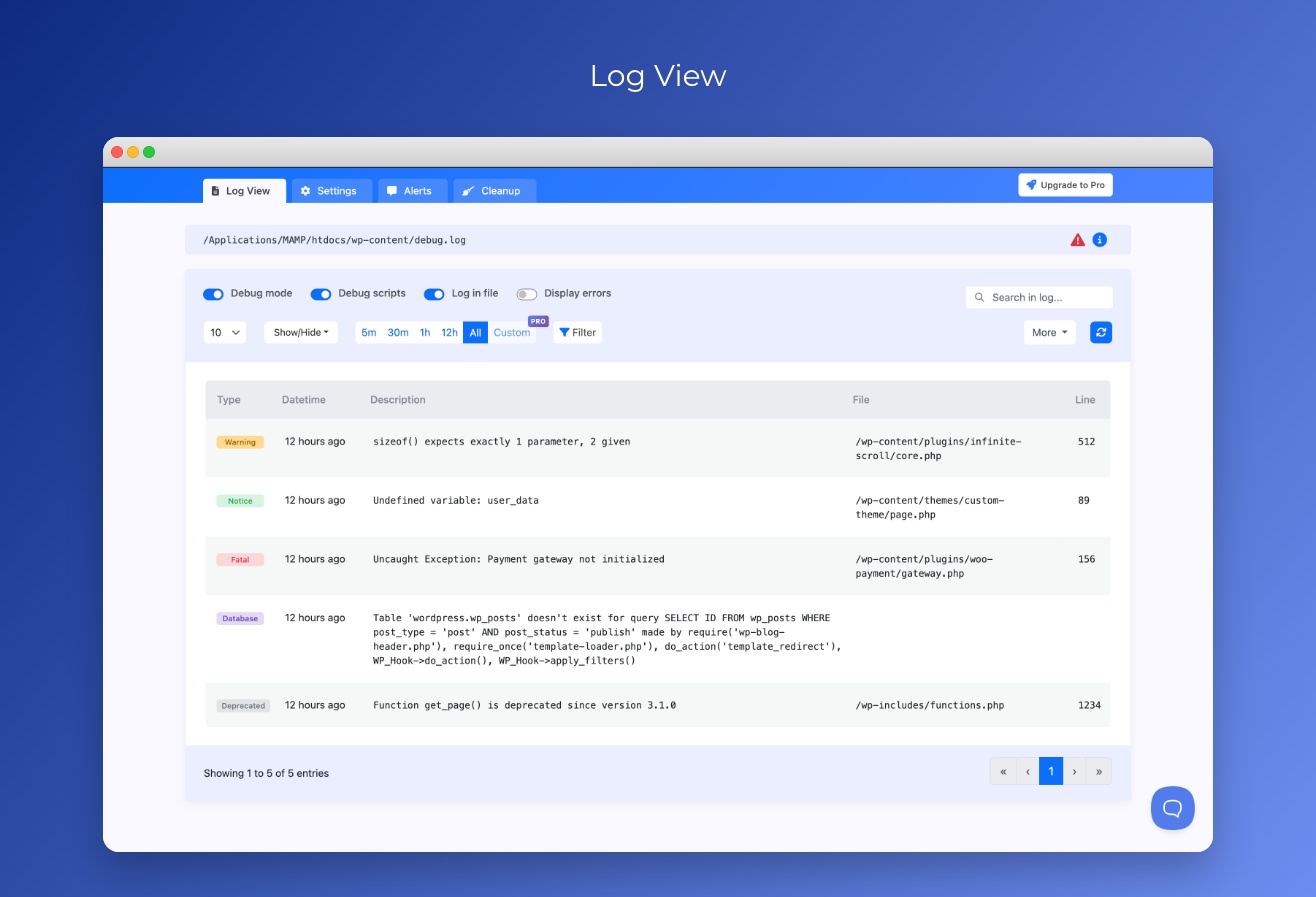
- Real-Time Log Viewer: Monitor your WordPress debug.log file in real-time, directly from your WordPress dashboard. No more hunting for files via FTP or cPanel!
- Easy Debug Log Access: Access and view your full debug log within a clean and intuitive interface.
- Smart Search: Find log entries quickly with intelligent search that matches space-separated words in any order.
- Advanced Search & Filtering: Quickly find specific log entries with powerful search and filtering options. Filter by error type, keywords, and date range (Pro). Use regular expressions for complex search patterns (Pro).
- Pagination: Navigate through large debug logs with ease using pagination, ensuring smooth performance even with extensive logs.
- Email Alerts for Errors: Get email alerts when new errors are logged. Pro users can customize error severity levels and recipients.
Flexible Settings Panel
- Control WP_DEBUG Constants: Enable or disable WP_DEBUG and WP_DEBUG_LOG constants directly from the plugin settings.
- Customize Logging Options: Configure your debug log settings to match your needs.
- Custom Log Path Support: Automatically detect and read custom debug.log locations.
Benefits of Using Debug Log Viewer
- Save Time and Effort: Stop manually accessing and parsing your debug log file.
- Faster Error Detection: Monitor errors as they happen and reduce troubleshooting time.
- Simplified Troubleshooting: Quickly identify the source of errors and warnings.
Debug Log Viewer Pro Features
Upgrade to Pro and get advanced tools for professional WordPress debugging and site maintenance:
- Regular Expression Search: Use powerful regex patterns to find complex log entries and patterns.
- Advanced Email Alerts: Choose error levels and send notifications to multiple recipients.
- CSV Export: Export debug log entries for analysis, reporting, or sharing.
- Custom Date Range Filtering: Analyze logs from specific time periods.
- Infinite Scroll Log Viewer: Browse large log files smoothly without pagination interruptions.
- Advanced Log Cleanup Controls: Manage debug.log size with custom limits, schedules, cleanup methods, and retention settings.
- Cleanup History: Review previous cleanup actions and track log maintenance.
Why choose Debug Log Viewer Pro?
Managing WordPress errors is not only about viewing logs.
Large debug files can consume disk space, become difficult to analyze, and slow down troubleshooting.
Pro gives you automation tools to monitor, export, filter, and maintain your debug logs efficiently.
Для кого Debug Log Viewer?
- Розробники WordPress
- Адміни сайтів
- Фрілансери, які керують сайтами клієнтів
- Agencies maintaining WordPress websites
- Anyone who wants an easy way to monitor WordPress errors
Скріншоти


Встановлення
- Встановлення: встановіть Debug Log Viewer з каталогу плагінів WordPress або завантажте zip-файл плагіна через адмін-панель WordPress.
- Активуйте плагін на сторінці Плагіни
- Доступ: перейдіть до меню “Debug Log Viewer” в панелі керування WordPress, щоб почати моніторинг файлу журналу
Відгуки


Учасники та розробники
“Debug Log Viewer” — проект з відкритим вихідним кодом. В розвиток плагіну внесли свій вклад наступні учасники:
Учасники
“Debug Log Viewer” було перекладено на 4 локалізації. Дякуємо перекладачам за їх роботу.
Перекладіть “Debug Log Viewer” на вашу мову.
Цікавитесь розробкою?
Перегляньте код, перегляньте сховище SVN або підпишіться на журнал розробки за допомогою RSS.
Журнал змін
2.5.2
- Updated dependencies
- Added Smart Search: Intelligent search that matches space-separated words in any order
- Added Regular Expression Search for advanced pattern matching (Pro feature)
2.4
- UI and design improvements
- Bug fixes
2.2.3
- Full-width layout
- Changed log file info panels
- Improved review banner
- UI and design improvements
- Package updates
2.1
- Added Auto-Cleanup feature to automatically manage debug.log file size (Pro: configurable 1-5000MB, Free: fixed at 50MB)
- Three cleanup methods available: Truncate (keep recent logs), Clear (remove all), Archive & Rotate (backup before clearing)
- Added cleanup history tracking with expandable view for up to 50 entries (Pro only)
- Various UI improvements, package upgrade and code optimizations
2.0.7
- Added ability to choose timezone for log entries
2.0.5
- Adjustments for Pro plan modal
- Fixed alerts cron unshedule issue (thanks to Leo for report)
2.0.4
- Security fix
2.0.3
- Minor UI fixes
- Added Ask for review banner
2.0.0
- Added datetime format selection (absolute/relative time display)
- Implemented custom date range filtering (Pro feature)
- Enhanced CSV export functionality (Pro feature)
- Introduced log file information popover with warnings and status
- Aadvanced email alerts, multiple error levels, up to 3 recipients (Pro feature)
- Increased log file size limit from 5MB to 10MB
- Security improvements and UI fixes
- Performance optimizations and code refactoring
1.4.3
- Updated design
- Added time display for the next notification
- Updated Freemius SDK to the latest version
1.4.2
- Callstack is now displayed in an accordion instead of a modal — allows viewing multiple entries simultaneously
- Added one-click copy functionality for Stack trace
- Updated Freemius SDK to the latest version
- Fixed issue with colVis extension, improved stability
1.4.1
- Updated design of Alert Emails
- Додано чат для швидшого спілкування
1.4
- Додано спеціальний конструктор пошуку для розширених умов фільтрації.
- Додано перевірку для налагоджувального файлу, щоб визначити, чи є він загальнодоступним за прямою URL-адресою.
- Додано модальне вікно попередження при увімкненні перемикача «Відображати помилки».
1.3
- Видалено застарілі та неактуальні пакунки, що зменшило розмір плагіна
- Парсинг користувацьких записів журналу
- Додана можливість фільтрувати записи за часовими інтервалами
- Оновлено Freemius SDK
- Оновлено DataTables
- Оновлені переклади
- Різні покращення інтерфейсу.
1.2.1
- Оновлення Freemius та WP-Config-Transformer
1.2
- Видалено реалізацію SSE для живих оновлень через нестабільну поведінку в деяких випадках
- Реалізовано автоматичні живі оновлення на основі додаткових AJAX запитів.
- Додано переклади для front-end фраз
- Реалізовано режим повної ширини контейнера з можливістю приховати бічну панель
- Інтегрований Freemius, щоб стати ближче до користувачів: форма зв’язку, додано посилання на форум
1.1
- Виправлена потокова передача SSE. Реалізовано поступові оновлення
- Зменшено ліміт читання журналу з 10Мб до 5Мб
- Added ability to collapse Alert block in sidebar to make workspace more clear
- Виправлено регулярний вираз для аналізу дати й часу з довгими часовими поясами
1.0.3
- Видалено плагін Toast, замість нього використані тости Bootstrap
- Незначний рефакторинг
1.0.2
- Додані активи (логотип)
1.0.1
- Виправити генерацію UUID
1.0.0
- Початковий випуск