

Опис
Rabietta Admin Menu Organizer helps site owners turn a crowded WordPress dashboard into a clear menu that non-technical users can navigate confidently.
The visual editor starts from the admin menu already registered by WordPress and installed plugins. Arrange it in three compact columns:
- Top-level menus
- Direct links or groups
- Links inside a group
Main features:
- Reorder existing WordPress admin links with drag and drop.
- Build native three-level navigation without replacing wp-admin.
- Create custom top-level menus, groups, and visual separators at every level.
- Rename visible labels without changing their original destinations.
- Hide menus, groups, or links without deleting their saved positions.
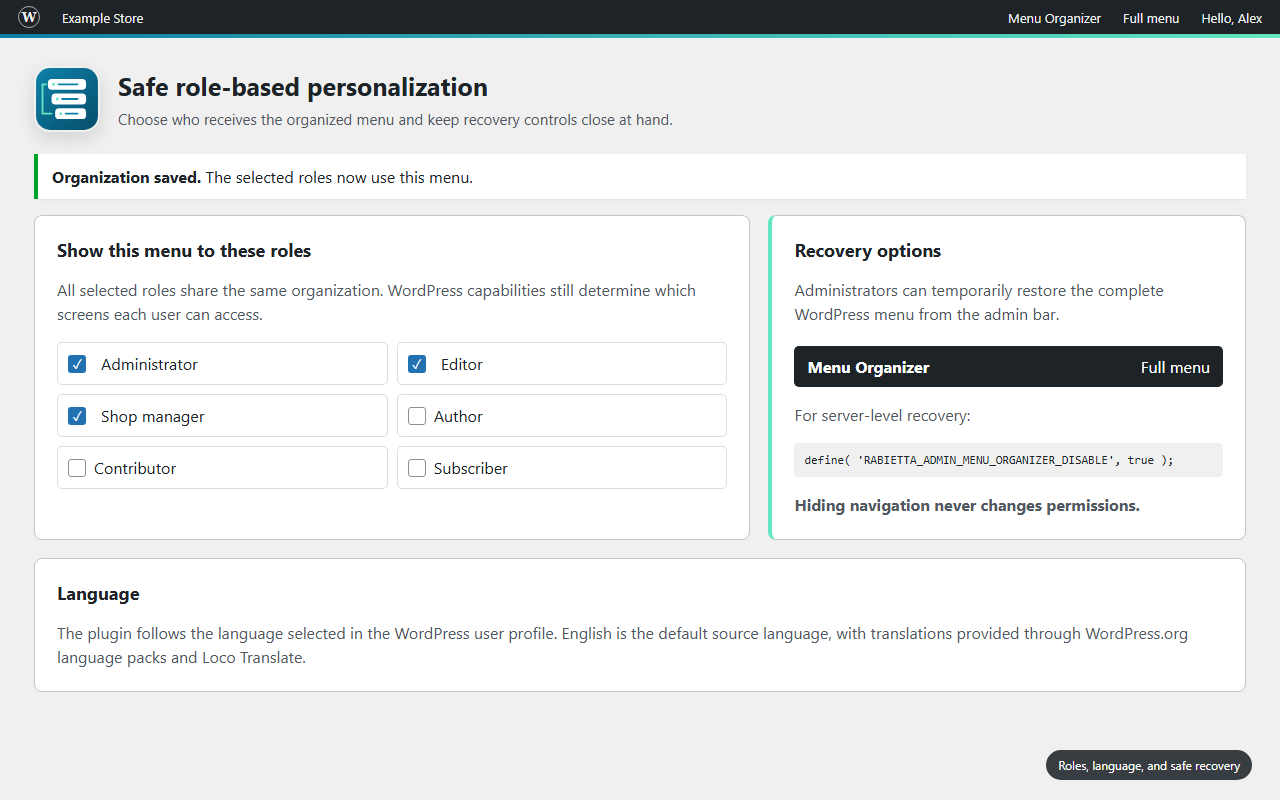
- Apply one organized layout to selected roles while preserving WordPress capabilities.
- Keep native menu icons, supported plugin icons, and notification counters where possible.
- Detect newly registered admin links and make them available in the editor.
- Move Menu Organizer itself to any supported level while keeping a protected recovery path.
- Recover the full WordPress menu from the admin bar, a URL switch, or a server constant.
- Fall back to accessible link pages when the enhanced third level cannot run.
The plugin does not add telemetry or connect to a Rabietta service.
Important: hiding a menu item changes navigation only. It does not revoke access to the destination. Use WordPress roles and capabilities for access control.
For predictable results, use only one admin-menu editor at a time.
Скріншоти


Встановлення
- Upload the plugin folder to
/wp-content/plugins/, or install the ZIP from Plugins > Add New > Upload Plugin. - Activate Rabietta Admin Menu Organizer.
- Open Menu Organizer in the WordPress admin menu.
- Review the menu detected from WordPress and installed plugins.
- Create parents, groups, or separators and arrange links across the three columns.
- Select the roles that should receive the organized menu.
- Select Enable organized menu when you are ready for the selected roles to use it, then save.
Activation alone does not change the admin menu. The organized layout is applied only after an administrator enables and saves it.
Часті питання
-
Does activating the plugin immediately change wp-admin?
-
No. The plugin starts disabled and does not reorganize the menu until an administrator explicitly enables and saves a valid layout.
-
Does the plugin create separators automatically?
-
No. New layouts start without separators. Add them manually only where they improve navigation. Existing separators that you created are preserved.
-
How do I change the plugin language?
-
The interface follows the language selected in your WordPress user profile. Open Users > Profile > Language to change it. If no user language is selected, WordPress uses the site language from Settings > General.
-
Does hiding a link remove the user’s permission to open it?
-
No. Hiding is a navigation preference, not an access-control feature. WordPress capabilities continue to determine whether a user can open a screen directly.
-
Yes. Select any available roles in the settings screen. All selected roles use the same layout, and WordPress removes links that each user is not allowed to access.
-
What happens when another plugin adds a new admin page?
-
The new link appears as unorganized and can be added from the access picker. Saved links from an unavailable plugin remain identifiable in the editor but are not rendered as working menu links.
-
Administrators can use Full menu in the admin bar. They can also add
?rabietta_menu_full=1to a wp-admin URL for a temporary full-menu view, or defineRABIETTA_ADMIN_MENU_ORGANIZER_DISABLEastrueinwp-config.php. -
Using two menu organizers at the same time can produce unpredictable results. Disable the other organizer before applying a Rabietta layout.
-
Does the plugin send any site or user data to Rabietta?
-
No. The menu configuration is stored in the site’s WordPress database and the plugin does not include telemetry or require an external account.
-
Does the editor work without JavaScript?
-
JavaScript is required for the visual three-column editor. The organized admin menu includes fallback pages so saved links remain reachable if the enhanced third-level interaction cannot run.
Відгуки
Для цього плагіна немає відгуків.
Учасники та розробники
“Rabietta Admin Menu Organizer” — проект з відкритим вихідним кодом. В розвиток плагіну внесли свій вклад наступні учасники:
Учасники
Перекладіть “Rabietta Admin Menu Organizer” на вашу мову.
Цікавитесь розробкою?
Перегляньте код, перегляньте сховище SVN або підпишіться на журнал розробки за допомогою RSS.
Журнал змін
1.0.1
- Added large dedicated drop zones for moving items directly between levels.
- Added safe reconciliation for dynamic or renamed plugin menu URLs to prevent false unavailable duplicates.
1.0.0
- First public release of Rabietta Admin Menu Organizer.
- Added a compact visual editor for native three-level admin navigation.
- Added separators at all three levels, including optional labels.
- Added translation-ready English source strings with WordPress.org language-pack and Loco Translate compatibility.
- Added a dedicated top-level Menu Organizer entry.
- Added role targeting, visibility controls, icon preservation, and notification counters.
- Added recovery controls and no-JavaScript fallback pages.
- Made the Menu Organizer access movable across the three levels while protecting it from deletion.
- Introduced the Rabietta Shift Stack identity and a native-size white sidebar icon.
- Added cache-safe asset URLs and a spacious, clearly grouped settings area.