

Опис
Turn your store visitors into buyers with wiseCampaign, the all-in-one WooCommerce marketing and conversion booster plugin. Create urgency, run scheduled flash sales, automate dynamic discounts, and reduce cart abandonment—all without writing a single line of code.
Whether you run Black Friday sales, seasonal promotions, or daily flash deals, wiseCampaign equips your WooCommerce store with battle-tested conversion tools.
Watch Quick Overview
Key Features at a Glance
- wiseBanner (Top Bar Campaign) – Sticky top/bottom promotional banners with real-time countdown timers, coupon copy triggers, and CTA buttons.
- StockBar (Scarcity Trigger) – Dynamic stock progress bar on single product pages to create purchase urgency and FOMO.
- Direct Checkout – Skip the cart page and route shoppers directly to checkout to reduce cart drop-offs.
- Live Sales Notifications – Real-time social proof popups showing recent customer orders to build instant buyer trust.
- wiseCart (Side Mini-Cart) – Fast slide-out mini-cart for an instant and seamless checkout experience.
- WiseVideo Commerce – Engage shoppers with interactive video galleries and shoppable product video widgets.
- Wise Product Table – Display products in responsive, filterable tables with bulk add-to-cart functionality.
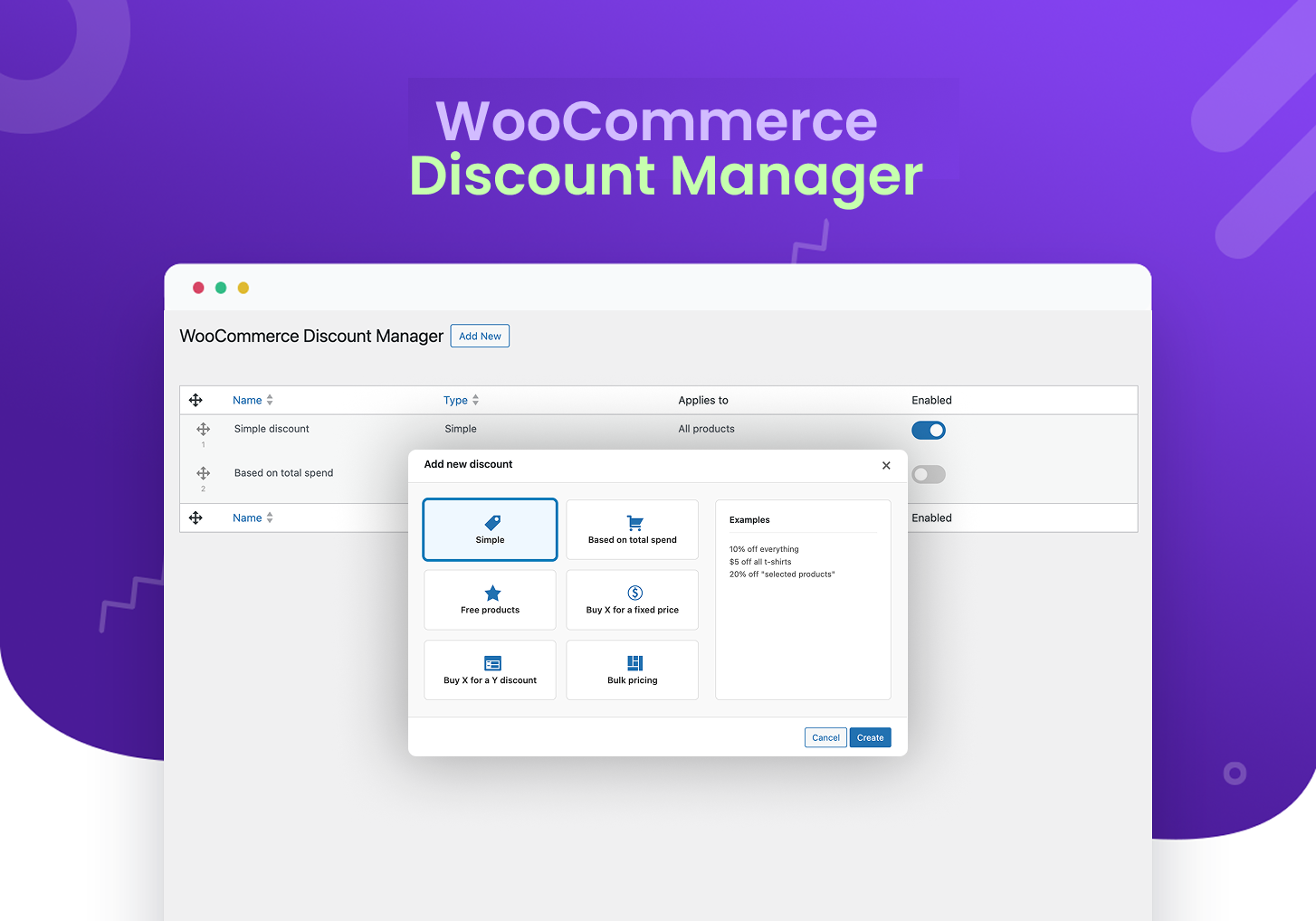
- Dynamic WooCommerce Discount Rules (Pro) – Automate tiered discounts, BOGO, bulk pricing, and spend-based offers.
Useful Links
Docs | Videos | Support | Idea Sharing | Facebook Group | Get Pro
Why Choose wiseCampaign Over Other Plugins?
- All-in-One Marketing Suite: Replace 4 to 5 separate plugins (Notification Popup, Countdown Bar, Stock Scarcity, Direct Checkout) with one clean plugin.
- Zero Speed Impact: Ultra-lightweight codebase built with scoped styling to ensure zero theme conflicts and blazing-fast site speed.
- Granular Display Rules: Show specific campaigns based on device (Mobile/Desktop), specific pages, or target user roles.
- Easy Customizer Integration: Real-time visual customizer to match your store branding in seconds.
Deep Dive into Core Modules
1. wiseBanner – Smart Announcement & Flash Sale Bar
- Customizable top or bottom notification bars.
- Built-in urgency countdown timer for limited-time offers.
- “Click-to-Copy” coupon code functionality with toast feedback.
- Targeted display on specific products, shop pages, or sitewide.
2. StockBar – Real-Time Inventory Urgency
- Visual progress bar displaying remaining stock levels.
- Triggers urgency for low-stock products to drive faster purchase decisions.
- Clean fallback logic that hides default stock text automatically.
3. Direct Checkout – Frictionless Buying Journey
- 1-Click direct checkout button on shop and product pages.
- Reduces funnel friction and increases checkout completion rates.
4. Live Sales Notifications – Automated Social Proof
- Realistic, non-intrusive recent sales alert popups.
- Highly customizable display timing, positions, and mobile visibility.
5. wiseCart – Modern Interactive Mini-Cart
- Floating side-cart drawer that lets shoppers review items instantly.
- Quick quantity adjustments without full page reloads.
6. WiseVideo Commerce – Shoppable Video Reels
- Interactive video widgets and shoppable product video embeds.
- Engage buyers with video demonstrations directly on product pages.
- Boosts user engagement, watch time, and conversion rates.
7. Wise Product Table – Interactive Product Catalog
- Responsive, searchable, and filterable product table layouts.
- Bulk add-to-cart actions for fast wholesale and multi-item orders.
- Perfect for B2B catalogs, restaurant menus, and large product inventories.
🔥 Pro Version: Advanced Discount Rules
Take your promotion strategy to the next level with advanced discount rules that go beyond simple coupons:
- ✅ Spend-Based Discounts: e.g., “Spend $100, Get 15% Off”.
- ✅ BOGO & Buy X Get Y: Automated free or discounted companion items.
- ✅ Tiered & Bulk Pricing: Quantity-based discount tables on product pages.
- ✅ Free Gift Rules: Automatically append gifts to cart when rules are met.
- ✅ Next Order Coupon Generator: Keep customers returning with automated loyalty discounts.
👉 Explore All Pro Features & Pricing
24/7 Support & Documentation
All wiseCampaign users get access to expert support and an extensive knowledge base for setup and configuration help.
* Documentation
* Help & Technical Support
Compatibilities
wiseCampaign integrates seamlessly with standard WooCommerce hooks, popular WordPress themes (Astra, OceanWP, GeneratePress, Storefront), and modern page builders.
Usage Instructions
- Go to WiseCampaign -> Settings, toggle the status to Active to enable the banner, and select a template from the list of views. Click Save.
- Go to Appearance -> Customize -> wiseCampaign to adjust colors, typography, timers, and layout settings.
Privacy Policy
wiseCampaign uses the Appsero SDK to collect basic telemetry data only upon explicit user opt-in via admin notice to help diagnose issues and improve features.
Appsero SDK does not gather any data by default and will not transmit information without your consent. Learn more at Appsero Privacy Policy.
Join Our Community
Скріншоти


Встановлення
From Your WordPress Dashboard
- Go to Plugins > Add New.
- Search for wiseCampaign.
- Click on the Install Now button.
- Click Activate after installation completes.
Manual Installation
- Download wiseCampaign.
- Upload the
wisecampaignfolder to the/wp-content/plugins/directory. - Activate wiseCampaign from your WordPress Plugins page.
Часті питання
-
Q. Who should use wiseCampaign?
-
A. Any WooCommerce store owner looking to boost conversion rates, run scheduled flash sales, reduce cart abandonment, and add social proof.
-
Q. What are the requirements to use wiseCampaign?
-
A. You need WordPress 5.4+ and WooCommerce active on your website. PHP 7.4 or higher is required.
-
A. Yes. You can target campaigns sitewide, restrict them to specific products/pages, or target devices (desktop or mobile).
-
Q. What features are included in the free version?
-
A. The free version includes wiseBanner, StockBar, Direct Checkout, Sales Notifications, and wiseCart.
-
Q. What extra features are available in the Pro version?
-
A. Pro unlocks the WooCommerce Dynamic Discount Manager (BOGO, bulk pricing, tiered discounts, spend-based rules), advanced targeting filters, premium pre-built templates, and deeper styling controls.
-
Q. Will wiseCampaign slow down my site?
-
A. No. wiseCampaign is performance-optimized and utilizes modular asset loading with scoped CSS resets to keep page load times fast.
-
Q. Do I need coding knowledge to use this plugin?
-
A. None at all. Everything is managed through an intuitive WordPress dashboard and visual settings.
Відгуки


Учасники та розробники
“wiseCampaign – WooCommerce Flash Sale, Countdown Timer, Discount Rules & Sales Notification” — проект з відкритим вихідним кодом. В розвиток плагіну внесли свій вклад наступні учасники:
Учасники

Цікавитесь розробкою?
Перегляньте код, перегляньте сховище SVN або підпишіться на журнал розробки за допомогою RSS.
Журнал змін
v1.1.19
- Added: Banner Position controls (Top and Bottom placement) for wiseBanner v2.
- Added: Sticky (Floating) vs. Non-Sticky mode for Top and Bottom banner positions.
- Improved: Enhanced wiseBanner editor UI with real-time live preview matching selected banner position.
- Fixed: Resolved Pro Upgrade modal button text contrast and visibility across theme styles.
- Fixed: Added WooCommerce endpoint function availability check in NextOrderCouponHandler.
- Fixed: Corrected Pro status synchronization on storefront for branding removal and feature gates.
- Fixed: Resolved non-sticky bottom banner container script loading priority in WordPress footer.
- Compatibility: Tested and verified compatibility with WordPress 6.7 and WooCommerce 9.6.
v1.1.17
- Security Fix: Added robust authorization checks (
manage_options) across all 22 REST API endpoints to prevent unauthorized settings modification. - Fixed: Resolved CSS isolation issues by implementing scoped
:where()resets, preventing plugin styles from bleeding into themes while allowing full control over editor UI. - UI: Fixed Stock Bar and Banner editor buttons appearing with heavy borders and invisible text colors.
- Pro Compatibility: Fixed “Discount Manager” and “License” submenus not showing in the sidebar due to slug mismatch.
- Compatibility: Ensured full compatibility with latest WordPress versions by refining admin menu registration.
v1.1.16
- Enhanced: Improved CSS architecture for React-based editor modules (Stock Bar and Banner v2).
- Fixed: Minor UI alignment and responsive layout issues in the admin dashboard.
- Performance: Optimized plugin-wide asset loading for faster admin performance.
v1.1.15
- Added “Click-to-Copy” functionality for coupon codes with dual notifications (tooltip and toast).
- Enhanced layout with increased horizontal padding for a premium, spacious appearance.
- Improved WordPress Media Library integration for background and badge image uploads.
- Reorganized display settings to integrate “Home Page” within the “Specific Pages” targeting logic.
- Extensive codebase cleanup: Removed legacy admin/build components in favor of the new modular system.
- Modernized admin menu navigation for a streamlined user experience.
- Fixed: Resolved intermittent “cURL error 28” (timeout) by replacing local loopback HTTP requests with direct filesystem access and class method calls.
- Improved performance and reliability for data loading during plugin activation and deactivation.
v1.1.14
- Added button to disable countdown, bogo and cta button.
- Fix font size after selection cta button.
- Improved stock visibilty by not showing default stock while stock bar enable.
- Improved overall plugin security and compatibility.
v1.1.13
- Added permission_callback to all REST API routes to meet WooCommerce Marketplace requirements.
- Secured all settings update endpoints with admin-only permissions.
- Fixed incorrect usage of register_uninstall_hook() causing activation warnings.
- Improved request validation and overall plugin stability.
v1.1.12
- Added smart WooCommerce dependency checks that block activation if WooCommerce isn’t installed or active.
- Gated StockBar, Direct Checkout, Sales Notification, and wiseCart screens so they’re only available when WooCommerce is active, with helpful notices otherwise.
- Improved admin notices to clearly explain WooCommerce requirements for all Woo-enabled features.
- added Help submenu.
- Added Upgrade to Pro submenu.
v1.1.11
- Fixed: WooCommerce Compatibility Declarations issue.
- Update: Security enhancements and latest compatibility.
v1.1.10
- Fixed: Wisecart related issue.
- Update: Hide advanced setting save button on free version.
v1.1.9
- Fixed: Sales nification reload issue.
- Update: Sales notification dashbaord design.
- Update: Security enhancements and latest compatibility.
v1.1.8
- Fixed: wiseBanner dashboard design.
- Fixed: wiseBanner background image field issue.
- Fixed: Advance feature license activation issue.
- Added: Security enhancements and latest compatibility.
v1.1.7
- Added Direct Checkout module.
- Added Sales Notification module.
- Added wiseCart module.
- Added security enhancements.
- Applied several fixes and improvements.
v1.1.6
- Fixed some minor bugs.
v1.1.5
- StockBar feature added.
- Fix sidebar button issue.
- Change getting started page design.
- Enhanced security and performance.
v1.1.4
- Heading and Sub Heading font family sync.
- Fix banner sticky issue.
- Bogo size fix
- Enhanced settings and customization options.
- Enhanced security and performance.
v1.1.3
- Update version and compatibility.
- Fixed minor bugs.
- Enhanced security and performance.
v1.1.2
- Redesigned with new features.
- Added new templates.
- Update version and compatibility.
- Enhanced settings and customization options.
- Fixed minor bugs.
- Enhanced security and performance.
v1.1.1
- Update version and compatibility.
- Dashboard design enhanced.
v1.1.0
- Update version and compatibility.
v1.0.0
- Initial release