
Опис
Vimeo Video Gallery, Youtube Video Gallery
Video Gallery Plugin Create YouTube Gallery & Create Vimeo Gallery into your WordPress site.
YouTube Api Generate. and create Easily Gallery into your WordPress site. Youtube Api Gallery
Video Gallery allows you to create a video gallery for WordPress. Video Gallery looks very impressive and functional.
The process of creating a video gallery only takes a few minutes and created gallery can be displayed on any page or post by shortcode.
Video Gallery is designed to be shown clearly and neatly on any screen size, No matter how small your device screens are it will automatically adjust to fit on that screens and display perfectly.
A beautiful responsive video gallery plugin supports desktop, tablet, and mobile browsers, you can have as many Youtube and Vimeo ” walls ” on the page as possible each with possibly different dimensions such as the main gallery wall and side bar gallery wall on the same page.
Gallery Plugin Create YouTube Gallery & Create Vimeo Gallery into your WordPress site.
This is very simple and easy video gallery plugin. Create video gallery shortcodes and publish on your blog.
You can create YouTube video galleries and Vimeo video galleries using plugin.
The software is responsive user friendly and can really enhance the rating of your site when people search for related topics and videos whether on Youtube, Vimeo and Wistia or search engines in general. Getting your Youtube, Vimeo or Wistia extension working is straightforward with a few simple steps required to build this great video resources on your WordPress site. The benefits of the gallery plugin are already making a real difference for all kinds of sites from business oriented to hobby or entertainment pages. The great thing about the Gallery is that it allows users to express their creative editing skills when composing a video collection slideshow or even workshop and information content. Being able to engage with site visitors this way directly with gallery also helps to make your site much more reiting.
Copy your video gallery shortcode like [VIDGAL id=001] and gallery is ready.
Upgrade To Premium Plugin – Click Here
Check Premium Plugin Demo – Click Here
Video Gallery PRO FEATURES AND DEMO
Must See Our Demo for Pro Version
- Gallery Shortcode
- YouTube Gallery
- YouTube API Gallery
- Vimeo Gallery
- Various Gallery
- Masonary Gallery
- Autoplay video
- Custom CSS
- Fast Support
- Column Settings
- Gallery Into footer
- Gallery Into widget
- Multiple Column Layouts
- Simple & User-Friendly Custom Plugin Dashboard
- Create Unlimited Galleries With Unlimited Videos
Upgrade To Premium Plugin – Click Here
Check Premium Plugin Demo – Click Here
Скріншоти

YouTube Video Gallery With Two Columns 
YouTube Video Playing Preview 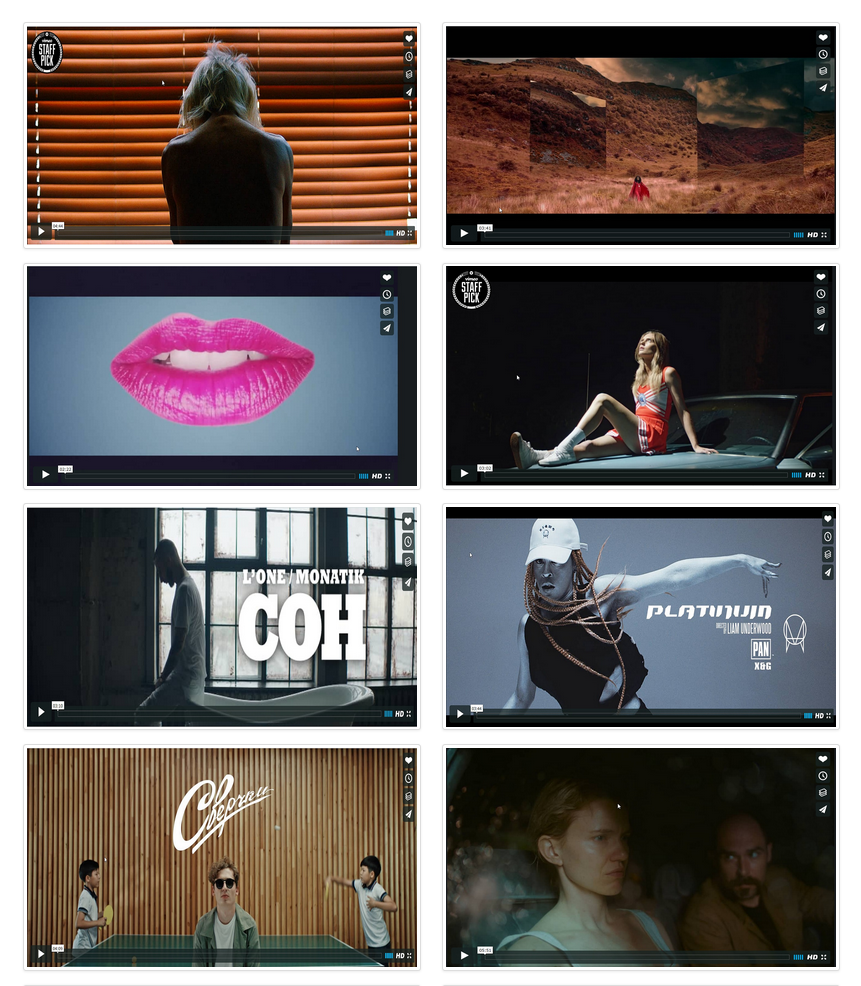
Vimeo Video Gallery With Two Columns 
Vimeo Video Playing Preview 
YouTube And Vimeo Mix Videos Gallery 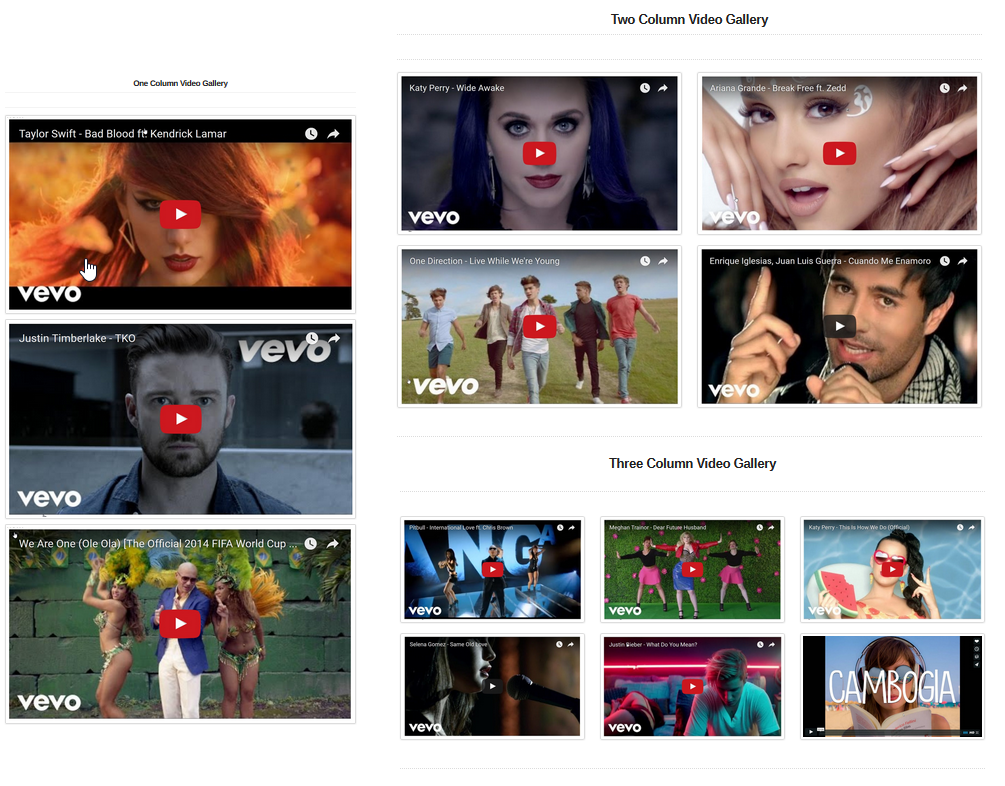
Video Gallery Columns Layout Preview 
Video Gallery Settings
Встановлення
Install Video Gallery either via the WordPress.org plugin directory, or by uploading the files to your server.
After activating Video Gallery plugin, go to plugin menu.
Login into admin dashboard.
Download, Install and Activate the Video Gallery plugin.
Create new video gallery using plugin menu.
Configure settings and save.
That’s it. You’re ready to go!
Часті питання
Have any queries?
Please post your question on plguin support forum
https://wordpress.org/support/plugin/new-video-gallery/
-
Recommended Plugins
-
The following are other recommended plugins by the author:
- Portfolio Filter Gallery – The Gallery Plugin to create awesome Portfolio Filter Gallery Plugin in minutes.
Buy Premium Plugin – Click Here
- Media Slider – The Media Slider Plugin to create Media / Video Slider Gallery Plugin in minutes.
Buy Premium Plugin – Click Here
- Best Weather Effect Plugin – Very Simple And Easy To Design Your Sites With Multiple Effects.
Buy Premium Plugin – Click Here
- Best Grid Gallery Plugin – Easy Grid Gallery Widget – Displaying your image in Page & Post widget/sidebar area with very easy.Allows you to customize it to looking exactly what you want.
Buy Premium Plugin – Click Here
- Social Media Plugin – Display your Social Media Plugin into Widget/Sidebar in WordPress site with very easily.
Buy Premium Plugin – Click Here
- Image Gallery Plugin – Gallery Lightbox – Displays all gallery images into the lightbox slider in just a few seconds.
Buy Premium Plugin – Click Here
- Slider Plugin – Fully Responsive Slider Gallery For WordPress ,You can Show Slider Into Page/Post & Widget/Sidebar By Generate Shortcode.
Buy Premium Plugin – Click Here
- Contact Form – Contact Form Widget Shortcode Plugin For WordPress.
Buy Premium Plugin – Click Here
- Best Responsive Slider Plugin – Fully Responsive Light Weight Easy Powerful WordPress Slider Slideshow Plugin.
Buy Premium Plugin – Click Here
- Video Gallery Plugin – The Best Responsive video gallery For WordPress.
Buy Premium Plugin – Click Here
-
Facebook Like Share Follow Button – Display your Facebook Like Share Follow Button Plugin into Page/Post & Widget/Sidebar in WordPress sites with very easily.
-
Google Plus Badge – Google+ Badge & Profile Widget For Show Into Widget & sidebar
-
Facebook Likebox Plugin – Facebook Light Box Plugin For WordPress
Відгуки


Учасники та розробники
“Video Gallery – Api Gallery, YouTube and Vimeo, Link Gallery” — проект з відкритим вихідним кодом. В розвиток плагіну внесли свій вклад наступні учасники:
Учасники


“Video Gallery – Api Gallery, YouTube and Vimeo, Link Gallery” було перекладено на 2 локалізації. Дякуємо перекладачам за їх роботу.
Перекладіть “Video Gallery – Api Gallery, YouTube and Vimeo, Link Gallery” на вашу мову.
Цікавитесь розробкою?
Перегляньте код, перегляньте сховище SVN або підпишіться на журнал розробки за допомогою RSS.
Журнал змін
1.5.4
- wordpress security issues fixed.
- Testing plugin for wordpress 6.4.3
1.5.3
- Bug Fix: Fixed.
- Additional changes: None.
- Testing plugin for wordpress 6.4.3
1.5.2
- Bug Fix: Fixed.
- Additional changes: None.
- Testing plugin for wordpress 6.4.2
1.5.1
- Bug Fix: Fixed.
- Additional changes: None.
- Testing plugin for wordpress 6.4.2
1.5.0
- Enhancements: tested for wordpress 6.3.2
1.4.9
- Enhancements: tested for wordpress 6.3.1
1.4.8
- Enhancements: tested for wordpress 6.2.1
1.4.7
- Enhancements: tested for wordpress 6.1.1
1.4.6
- YouTube API Gallery Bug Fixed.
- Enhancements: tested for wordpress 6.1.1
1.4.5
- YouTube API Gallery Feature Added.
- Enhancements: tested for wordpress 6.1.1
1.4.4
- Video thumbnail icon setting added.
- Enhancements: tested for wordpress 6.0.1
1.4.3
- wordpress security isshues fixed.
- Enhancements: tested for wordpress 6.0.1
1.4.2
- youtue & vimeo icon added.
- Enhancements: tested for wordpress 6.0.1
1.4.1
- Enhancements: tested for wordpress 6.0
1.4.0
- Enhancements: tested for wordpress 5.9.3
1.3.9
- Enhancements: tested for wordpress 5.9
1.3.8
- Enhancements: tested for wordpress 5.8.3
- Video link Bug fixed.
1.3.7
- Enhancements: tested for wordpress 5.8.2
- wordpress security isshues fixed
1.3.6
- Enhancements: tested for wordpress 5.8.1
1.3.5
- Fixed Security issues.
- Bug Fix: Fixed.
- Enhancements: Yes,
1.3.4
- Enhancements: tested for wordpress 5.7.2
1.3.3
- Enhancements: tested for wordpress 5.7.1
1.3.1
- Enhancements: tested for wordpress 5.6.2
1.3.0
- Enhancements: tested for wordpress 5.6 and setting update.
- Bug Fix: Yes
- Additional changes: Title and Desc. css added
1.2.10
- Enhancements: tested for wordpress 5.5.3
- Bug Fix: Yes
1.2.9
- Enhancements: tested for wordpress 5.5.3
1.2.8
- Enhancements: tested for wordpress 5.5.1
1.2.7
- Enhancements: tested for wordpress 5.5
1.2.6
- Enhancements: tested for wordpress 5.4.2
1.2.5
- Enhancements: tested for wordpress 5.4.1
1.2.4
- Enhancements: tested for wordpress 5.3.2
1.2.3
- Enhancements: tested for wordpress 5.3.2
1.2.2
- Enhancements: tested for wordpress 5.3
- Additional changes: Bootstrap bugs fixed.
1.2.0
- Enhancements: tested for wordpress 5.2.3
- Bug Fix: Yes
- Additional changes: setting page update and bootstrap library update.
1.0.10
- Enhancements: tested for wordpress 5.2.3
1.0.9
- Enhancements: tested for wordpress 5.2.3
1.0.8
- Enhancements: tested for wordpress 5.2.2
- Bug Fix: Yes
- Additional changes: None.
1.0.7
- Enhancements: tested for wordpress 5.2.2
- Bug Fix: Yes
- Additional changes: None.
1.0.6
- Enhancements: tested for wordpress 5.2.2
- Bug Fix: Yes
- Additional changes: None.
1.0.5
- Enhancements: tested for wordpress 5.2.1
- Bug Fix: Yes
- Additional changes: None.
1.0.4
- Enhancements: tested for wordpress 5.2.1
- Bug Fix: Yes
- Additional changes: None.
1.0.3
- Enhancements: tested for wordpress 5.1.1
- Bug Fix: Yes
- Additional changes: None.
1.0.2
- Enhancements: tested for wordpress 5.1.1
- Bug Fix: Yes
- Additional changes: None.
1.0.1
- Enhancements: tested for wordpress 5.1
- Bug Fix: Yes
- Additional changes: None.
1.0.0
- Enhancements: tested for wordpress 5.0.3
- Bug Fix: Yes
- Additional changes: None.
0.3.5
- Enhancements: tested for wordpress 5.0.3
- Bug Fix: Yes
- Additional changes: None.
0.3.4
- Enhancements: tested for wordpress 5.0.2
- Bug Fix: Yes
- Additional changes: None.
0.3.3
- Enhancements: tested for wordpress 5.0.1
- Bug Fix: typos fix
- Additional changes: None.
0.3.2
- Enhancements: None.
- Bug Fix: Yes.
- Additional changes: Custome shortcode copy function added.
0.3.1
- Enhancements: None.
- Bug Fix: No.
- Additional changes: update link,
0.3.0
- Enhancements: Added hindi translation file.
- Bug Fix: 1. Background vimeo videoplaying issue fixed, 2. Auto close fixed.
- Additional changes: None,
0.2.17
- Enhancements: Added hindi translation file.
- Bug Fix: None,
- Additional changes: None,
0.2.16
- Enhancements: tested for wordpress 4.9.8
- Bug Fix: typos fix
- Additional changes: plugin is translation ready
0.2.15
- Enhancements: tested for wordpress 4.9
- Bug Fix: None
- Additional changes: yes, Added theme menu.
Feature Enhancements: Version 0.2.14
* Enhancements: None
* Bug Fix: Fixed
* Additional changes: None
Feature Enhancements: Version 0.2.13
* Enhancements: None
* Bug Fix: Fixed
* Additional changes: None
Feature Enhancements: Version 0.2.12
* Enhancements: None
* Bug Fix: None
* Additional changes: None
Feature Enhancements: Version 0.2.11
* Enhancements: Tested Upto New version 4.8.1
* Bug Fix: None
* Additional changes: None
Feature Enhancements: Version 0.2.10
* Enhancements: compatible for WordPress New version 4.8
* Bug Fix: None
* Additional changes: None
Feature Enhancements: Version 0.2.9
* Enhancements: compatible for WordPress New version 4.8
* Bug Fix: None
* Additional changes: None
Feature Enhancements: Version 0.2.8
* Enhancements: compatible for WordPress New version 4.8
* Bug Fix: None
* Additional changes: None
Feature Enhancements: Version 0.2.7
* Enhancements: None
* Bug Fix: None
* Additional changes: None
Feature Enhancements: Version 0.2.6
* Enhancements: None
* Bug Fix: None
* Additional changes: None
Feature Enhancements: Version 0.2.5
* Enhancements: None
* Bug Fix: None
* Additional changes: None
Feature Enhancements: Version 0.2.4
* Enhancements: None
* Bug Fix: None
* Additional changes: None
Feature Enhancements: Version 0.2.3
* Enhancements: None
* Bug Fix: None
* Additional changes: None
Feature Enhancements: Version 0.2.2
* Enhancements: None
* Bug Fix: None
* Additional changes: None
Feature Enhancements: Version 0.2.1
* Enhancements: None
* Bug Fix: None
* Additional changes: None
Feature Enhancements: Version 0.2.0
* Enhancements: None
* Bug Fix: None
* Additional changes: None
Feature Enhancements: Version 0.1.10
* Enhancements: None
* Bug Fix: None
* Additional changes: None
Feature Enhancements: Version 0.1.9
* Enhancements: None
* Bug Fix: None
* Additional changes: None
Feature Enhancements: Version 0.1.8
* Enhancements: None
* Bug Fix: None
* Additional changes: None
Feature Enhancements: Version 0.1.7
* Enhancements: None
* Bug Fix: None
* Additional changes: None
Feature Enhancements: Version 0.1.6
* Enhancements: add select video poster setting
* Bug Fix: None
* Additional changes: None
Feature Enhancements: Version 0.1.5
* Enhancements: add select video poster setting
* Bug Fix: None
* Additional changes: None
Feature Enhancements: Version 0.1.4
* Enhancements: Compatible For New Version 4.7.1
* Bug Fix: None
* Additional changes: None
Feature Enhancements: Version 0.1.3
* Enhancements: None
* Bug Fix: None
* Additional changes: None
Feature Enhancements: Version 0.1.2
* Enhancements: None
* Bug Fix: None
* Additional changes: yes, user interface layout changed
Feature Enhancements: Version 0.1.1
* Enhancements: yes, two new settings added
* Bug Fix: None
* Additional changes: yes, user interface layout changed
Feature Enhancements: Version 0.1.0
* Enhancements: None
* Bug Fix: None
* Additional changes: None
Feature Enhancements: Version 0.0.10
* Enhancements: None
* Bug Fix: None
* Additional changes: None
Feature Enhancements: Version 0.0.9
* Enhancements: None
* Bug Fix: None
* Additional changes: None
Feature Enhancements: Version 0.0.8
* Enhancements: None
* Bug Fix: None
* Additional changes: None
Feature Enhancements: Version 0.0.7
* Enhancements: None
* Bug Fix: None
* Additional changes: None
Feature Enhancements: Version 0.0.6
* Enhancements: None
* Bug Fix: None
* Additional changes: None
Feature Enhancements: Version 0.0.5
* Enhancements: None
* Bug Fix: None
* Additional changes: None
Feature Enhancements: Version 0.0.4
* Enhancements: None
* Bug Fix: None
* Additional changes: None
Feature Enhancements: Version 0.0.1
* Enhancements: None
* Bug Fix: None
* Additional changes: None